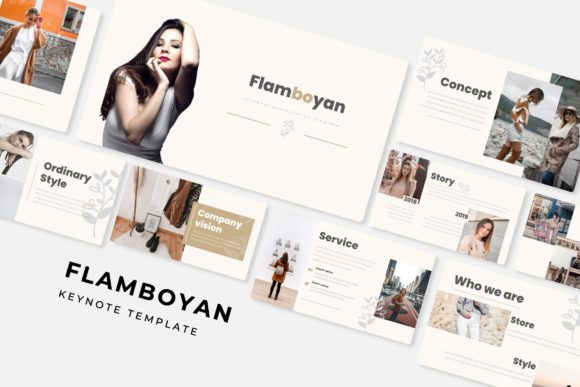
Flamboyan Keynote Template: A Closer Look at Its Structure and Practical Value
When you are preparing a presentation that needs to carry weight—whether for a client pitch, a product launch, an internal training session, or a portfolio review—the design of your slides can either support your message or undermine it. The Flamboyan Keynote Template aims to be a resource that eliminates the gap between a good idea and a well-designed deck. With 150 total slides spread across five distinct color variations, this template offers a substantial foundation for a wide range of presentation needs. But volume alone does not guarantee a useful tool. What matters is how well those slides are built, how adaptable they are, and whether they actually save you time without forcing you to compromise on quality.
What Flamboyan Keynote Template Offers Beyond the Slide Count
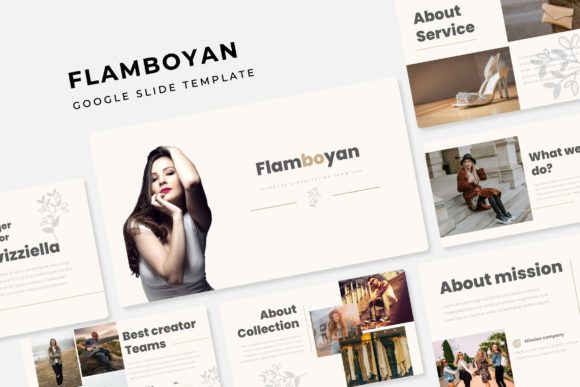
The headline number—150 slides—immediately signals that this is not a minimal or throwaway set. However, the real value lies in how those slides are organized. Flamboyan is structured as five separate Keynote files, each containing 30 slides and a distinct premade color scheme. That means you are not flipping through a single massive file trying to find a slide that matches your chosen palette. Instead, each color variation is self-contained, making navigation straightforward and reducing the risk of accidentally mixing incompatible styles within the same deck.
Behind the scenes, the template is built on master slides. This is a significant detail for anyone who has ever needed to apply a consistent change across dozens of slides. When you adjust a master slide, every slide linked to that master updates automatically. In real-world use, this means you can tweak a heading font, adjust a background element, or reposition a footer without editing each slide individually. For presentations with 30 or more slides, that kind of efficiency is not just convenient; it is a genuine time-saver that helps you maintain consistency under tight deadlines.
Color Variations and Their Practical Impact on Presentation Tone
Color choice influences how an audience perceives your content. A finance-oriented audience might expect cooler, more conservative tones, while a creative agency may respond better to warmer or bolder palettes. Flamboyan provides five premade color variations, each applied consistently across its 30-slide set. This allows you to select a palette that aligns with your brand, your subject matter, or the emotional tone you want to set.
Having five distinct options also means you are not locked into a single look. If you are preparing decks for multiple clients or departments, you can choose the variation that best fits each context. And because each file is separate, you avoid the clutter of unused slides or mismatched colors. The color schemes are applied globally, so if you later decide to switch from one palette to another, you can simply open the appropriate file and drop in your content.
Handcrafted Infographics and Section Break Slides: Built-In Structure
Presentations often struggle with two things: making data digestible and providing clear transitions between topics. Flamboyan addresses both through handcrafted infographic slides and dedicated section break slides.
The infographic slides are prebuilt with data-friendly layouts—charts, icon groupings, process flows, and comparison zones. They are designed to be edited, so you can replace placeholder text, swap icons, and adjust colors without breaking the layout. For someone who regularly needs to present survey results, timelines, or statistical highlights, these slides remove the friction of starting from a blank canvas.
Section break slides serve a different but equally important role. They give your audience a visual pause and signal that you are moving to a new topic. In longer presentations—say, a 20-minute pitch or a 45-minute training session—these transition slides help maintain clarity. Without them, audiences can lose track of the narrative thread. Flamboyan includes these breaks as part of its standard layout, which suggests that the template was designed with real presentation flow in mind, not just static slide aesthetics.
Gallery and Portfolio Slides for Visual Storytelling
A separate set of gallery and portfolio slides expands the template's usefulness beyond standard corporate decks. If your work involves showcasing products, projects, photographs, or client work, these slides give you a structured way to present visuals without overcrowding. They include picture placeholders with a drag-and-drop workflow, which means you can insert images directly into predefined frames rather than manually resizing and cropping each one. This is especially practical when you are working with a large volume of images and need to maintain consistent spacing and proportions.
For freelancers, photographers, designers, and small business owners, these portfolio slides can serve as the backbone of a client-facing presentation. You can walk a potential client through your past work without needing to design custom layouts for each piece. The consistency of the presentation also reinforces a professional image—something that matters when you are competing for new business.
Resizable and Editable Graphics: Flexibility Without Breaking Design
One of the more frustrating experiences with presentation templates is discovering that a graphic or icon cannot be resized without becoming distorted or losing alignment. Flamboyan uses pixel-perfect illustrations and editable graphics that are designed to be resized and adjusted. This is not a universal feature across templates, and it is worth checking before you commit to a set.
In practice, this means you can scale an icon down for a footnote or enlarge it for a full-slide visual without worrying about pixelation or awkward stretching. The graphics are vector-based in approach, which gives you the freedom to experiment with layout without being locked into preset dimensions. For anyone who has ever spent twenty minutes trying to realign a misplaced image, this level of flexibility is a practical advantage that reduces frustration and speeds up the editing process.
What Is Included and What Is Not
The Flamboyan Keynote Template package includes five separate PPTX files—one for each color variation. All files are formatted for widescreen (16:9), which is the standard for most modern projectors and screens. A Readme file is also included, along with a link to download the font used in the template. The font is free, so there is no additional cost or licensing hurdle.
It is important to note that the photographs or images shown in the preview are not included. They are used for illustration purposes only. This is standard practice for presentation templates, but it is worth keeping in mind. If the preview images influenced your decision, you will need to source your own photography or use stock images. The template provides placeholders, but the content itself is your responsibility.
Additionally, the template is delivered in PPTX format, which is compatible with Keynote but originally designed for PowerPoint. Most users will open the files in Keynote without issue, but if you are working in a mixed-environment team or need to share files back and forth, you may occasionally encounter minor formatting shifts. Testing a few slides before committing to a full build is a reasonable precaution.
Who Benefits Most from Flamboyan Keynote Template
Given its structure and feature set, Flamboyan is best suited for professionals who create presentations regularly but do not have dedicated design support. That includes:
- Marketing professionals and brand managers who need to produce consistent decks for campaigns, client updates, or internal strategy sessions.
- Entrepreneurs and small business owners who present to investors, partners, or customers and want a polished look without hiring a designer for every deck.
- Freelancers and creators in fields like photography, design, or consulting who rely on portfolio presentations to win work.
- Educators and trainers who deliver content across multiple sessions and need clear transitions and data-friendly slides.
- Bloggers and publishers who repurpose presentation materials for webinars, online courses, or media kits.
The template is less ideal for those who need a highly customized, brand-specific design from the ground up. While the colors and graphics are editable, the core layouts remain fixed. If your brand requires unconventional slide structures or very specific typographic hierarchies, you may find yourself editing more than expected. In that case, a fully custom design might be a better investment.
Observations on Usability and Long-Term Value
Over time, a presentation template proves its worth not by how it looks on the first use, but by how well it holds up across multiple projects. Flamboyan's reliance on master slides and editable graphics suggests that it can be reused and adapted without degrading in quality. The five color variations also extend its lifespan, because you are not stuck with one palette as your needs evolve.
One practical consideration is the initial setup. Because the package includes five separate files, you will want to organize them clearly in your file system before you begin. Copy the template files to your project folder, choose your color variation, and then start editing. Avoid working inside the original files directly; create a copy each time. This preserves the clean templates for future use.
Another observation is that the template does not force a specific content structure. While it provides section breaks, infographic layouts, and portfolio slides, you are free to arrange them in any order. This flexibility is valuable because no two presentations follow the same narrative arc. You can pull slides from the template as needed and build a deck that matches your specific flow rather than being forced into a rigid sequence.
Limitations Worth Noting
No template is perfect, and Flamboyan has a few limitations that are worth acknowledging. First, the template's aesthetic leans toward a clean, modern, and slightly decorative style. If your presentation requires a very minimal or text-heavy approach, some of the graphic elements may feel extraneous. You can remove them, of course, but that adds editing time.
Second, as mentioned earlier, the preview images are not included. If you were drawn to a specific look in the preview, you will need to replicate it with your own assets. This is standard, but it is worth factoring into your workflow.
Third, while the template is compatible with Keynote, it originates from a PowerPoint environment. Users who rely on advanced Keynote-specific features—such as magic move transitions or certain animation presets—may find that those elements are not built in. The template focuses on static slide layouts, not animated sequences. If your presentations rely heavily on motion graphics, you may need to add those effects yourself.
Final Thoughts on Real-World Fit
The Flamboyan Keynote Template offers a well-structured, flexible foundation for professionals who need to produce high-volume presentations without sacrificing consistency or visual quality. Its five color variations, handcrafted infographics, section breaks, and portfolio slides address common pain points that arise when building decks from scratch or from templates that lack depth. The master slide architecture and editable graphics reduce repetitive work, which is where most presentation creators lose time.
If your workflow involves creating regular presentations for distinct audiences or projects, and you value layout consistency without wanting to design every slide, this template is worth considering. It is not a substitute for custom design if you need a fully unique brand identity, but for the majority of professional uses—pitches, reports, training, portfolios—it provides a solid, reusable system that can support your content effectively.