Flamboyan Google Slide Template: A Practical Review of Its Design and Utility
Understanding the Flamboyan Google Slide Template
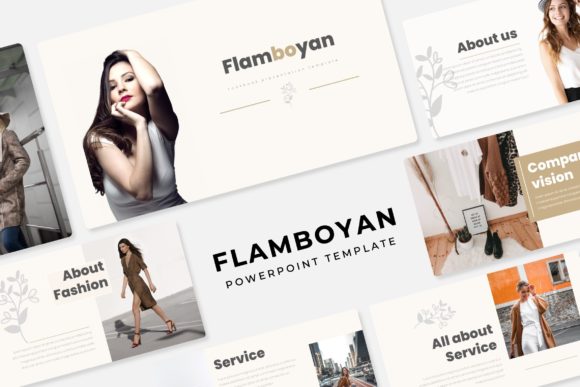
The Flamboyan Google Slide Template is a presentation asset built for users who need structure, variety, and visual consistency across multiple projects. With a total of 150 slides organized into 5 premade color variations, each variation includes 30 slides. This structure allows you to choose a color direction that fits your brand or message without rebuilding slides from scratch. The template is delivered as 5 separate PPTX files, each formatted for widescreen presentation, which means you can open, edit, and present directly in Google Slides or Microsoft PowerPoint.
What sets the Flamboyan apart from simpler templates is its inclusion of handcrafted infographics, section break slides, and dedicated gallery and portfolio slides. These are not generic placeholders—they are designed to help you present data, separate content sections, and showcase visual work with minimal effort. Whether you are preparing a client pitch, an internal report, or a creative portfolio, the template provides a coherent visual language that saves time and reduces design friction.
150 Total Slides with 5 Color Variations
Having 30 slides per color variation means you get a complete presentation framework in each file. The five premade colors cover a range of tones, from neutral and professional to bolder accent palettes. This variety matters when you present to different audiences or need to align with brand guidelines without spending hours recoloring elements. Each variation retains the same layout structure, so switching between color schemes is straightforward once you understand the slide hierarchy.
Handcrafted Infographics
The infographics included in the Flamboyan template are built with attention to clarity and visual hierarchy. Rather than relying on basic charts, you get diagram-style graphics that can communicate processes, comparisons, timelines, and relationships. These infographics are editable, which means you can adjust colors, text, and element sizes to match your specific data. For professionals who need to explain complex information quickly, these assets reduce the time spent on visual storytelling.
Section Break Slides and Portfolio Layouts
Section break slides are often overlooked in template design, but they play a crucial role in guiding an audience through a long presentation. The Flamboyan includes dedicated break slides that allow you to signal a shift in topic or chapter cleanly. Similarly, the gallery and portfolio slides give you a structured way to display images, screenshots, or project samples. If you are a photographer, designer, or marketer who regularly presents visual work, these slides help maintain a polished, professional flow.
Resizable, Editable Graphics and Picture Placeholders
All graphics in the template are resizable and editable without losing quality. The picture placeholders support drag-and-drop image insertion, which means you can replace sample images with your own files in seconds. This feature is especially useful when you work under tight deadlines and need to populate slides quickly. The graphics are vector-based and pixel-perfect, so scaling them up or down does not introduce blurriness or distortion.
Master Slide-Based Structure
The template is built on master slides, which is a practical advantage for maintaining consistency across your entire presentation. When you edit a master slide, changes apply globally to all slides that use that layout. This feature is valuable when you need to update a logo, change a background color, or adjust a footer across dozens of slides. It also ensures that anyone on your team who uses the template will produce slides that feel part of the same visual family.
Design Quality and Real-World Usability
In real-world use, the Flamboyan Google Slide Template performs well for presentations that require a balance between structured layouts and creative flexibility. The pixel-perfect illustrations and handcrafted elements give the slides a refined look that does not feel overly corporate or overly casual. This middle ground makes the template suitable for a range of contexts, from boardroom meetings to conference talks and client presentations.
The 5 PPTX files included are ready to use in both Google Slides and PowerPoint. The widescreen format (16:9) matches modern display standards, so your slides will fill screens without awkward letterboxing. The readme file provides clear instructions on font usage, including a link to download the recommended free fonts. This is a practical detail because using the correct fonts ensures your slides render as intended across different devices and operating systems.
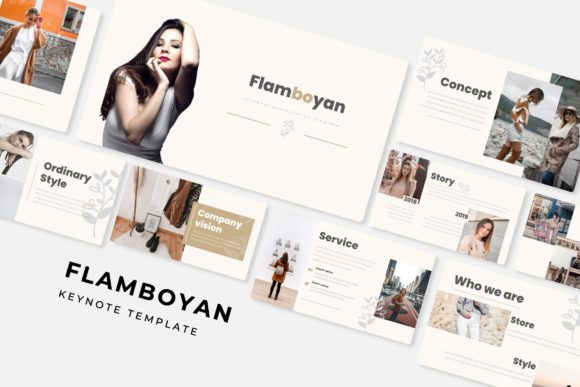
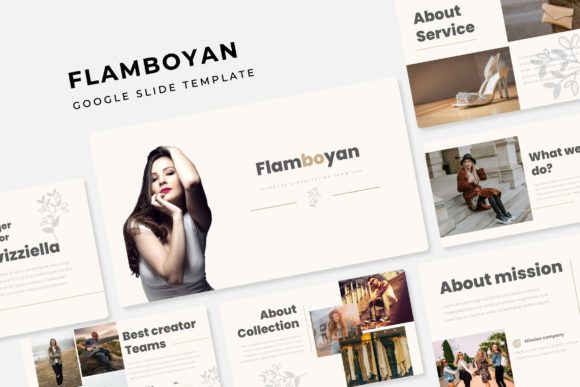
One limitation to note is that the photographs or pictures shown in the preview are not included in the download. They are used for illustration purposes only. If you rely heavily on stock imagery, you will need to source your own photos to fill the picture placeholders. This is standard practice for template assets, but it is worth factoring into your workflow and budget if you need a large number of images.
Who Benefits Most from This Template
The Flamboyan Google Slide Template is a strong fit for professionals and entrepreneurs who create presentations regularly but do not have dedicated design support. Marketers, freelancers, small business owners, and educators will find the handcrafted infographics and portfolio slides especially useful because these elements reduce the need to build visual assets from scratch. Creators and bloggers who present case studies or project work will appreciate the gallery layouts that display images in a structured yet visually appealing way.
For teams that collaborate on presentations, the master slide foundation and consistent color variations make it easier to maintain brand alignment across multiple contributors. The 5 premade colors also allow different departments or projects to use a distinct palette while keeping the same layout structure, which can be helpful in larger organizations.
Serious hobbyists—such as those producing presentations for community events, workshops, or personal projects—will find the template approachable without being restrictive. The drag-and-drop picture placeholders and editable graphics lower the technical barrier, so you can achieve a professional look without advanced design skills.
Practical Considerations and Limitations
While the Flamboyan template offers substantial value, there are a few practical considerations to keep in mind. First, the 30 slides per color variation are fixed in number, so if you need more slides than that for a single presentation, you will need to duplicate and adapt existing layouts. The master slide structure helps with this, but it does require some familiarity with slide editing tools.
Second, the template relies on a consistent visual style across all slides. If your content includes a high volume of dense text or data tables that do not fit the infographic formats, you may need to adjust layouts or simplify your content to match the design aesthetic. This is not a weakness of the template itself, but it is something to consider if your presentations are text-heavy.
Third, the free fonts linked in the readme file may not be available on all devices by default. You will need to download and install them on each machine where you edit the presentation. If you share the file with collaborators, ensure they also have the fonts installed to avoid unexpected layout shifts.
Finally, as mentioned, the preview images are not part of the download. You will need to supply your own photographs or illustrations to fill the picture placeholders. This gives you full control over the visual content, but it also means you should plan your image sourcing in advance, especially for time-sensitive projects.
Final Observations
The Flamboyan Google Slide Template delivers a well-rounded set of design assets for anyone who needs to create polished presentations efficiently. Its 150 slides across 5 color variations, handcrafted infographics, and portfolio-friendly layouts address common presentation challenges without adding unnecessary complexity. The master slide foundation and editable graphics provide the flexibility to adapt the template to different brands, audiences, and content types.
For professionals, entrepreneurs, and creators who value consistency and visual clarity, the Flamboyan template is a practical resource that balances ready-made design with room for personalization. Understanding its structure and preparing your own imagery in advance will help you get the most out of the template, whether you are preparing a single pitch or building a library of presentation assets for ongoing use.