Curcao Co Keynote Template: A Flexible Presentation Framework for Diverse Needs
When preparing a presentation, the choice of template can significantly influence both the visual quality of the slides and the efficiency of the creation process. The Curcao Co Keynote Template is a comprehensive slide package designed for users who need variety, consistency, and ease of customization. With 150 total slides spread across five distinct color variations, this template aims to support a wide range of presentation goals, from corporate pitches to portfolio reviews.
This article evaluates the Curcao Co Keynote Template from a practical standpoint, exploring its structure, feature set, and the types of situations where it may serve you well—or where an alternative might be a better fit. Rather than focusing on promotional claims, the goal here is to help you assess whether this template aligns with your specific workflow, design preferences, and content requirements.
What the Curcao Co Keynote Template Offers
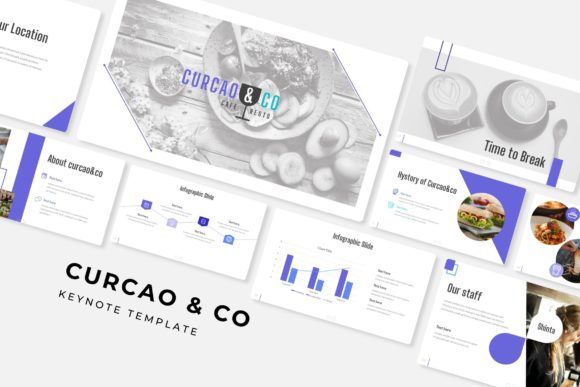
At its core, the Curcao Co Keynote Template provides a structured yet adaptable foundation for building presentations. The package contains five separate PowerPoint files (PPTX), each featuring a distinct premade color scheme. Each file includes 30 slides, bringing the total to 150 unique slide layouts. The five color variations allow you to choose a palette that matches your brand, topic, or audience preferences without needing to manually adjust colors across dozens of slides.
Beyond the color options, the template includes several design assets that add depth and clarity to presentations. Among these are handcrafted infographics, section break slides, and dedicated gallery and portfolio slides. The inclusion of drag-and-drop picture placeholders simplifies image integration, while resizable and editable graphics give you control over layout and scale. Pixel-perfect illustrations are incorporated throughout, ensuring that visual elements remain sharp and consistent regardless of screen size or resolution.
The template also operates on master slides, meaning that global changes—such as updating a font or repositioning a logo—can be applied across all slides at once. This feature is especially valuable for users who need to maintain uniformity across a large deck.
Handcrafted Infographics
Infographics are a common requirement in modern presentations, whether for displaying data, timelines, processes, or comparisons. The handcrafted infographics in the Curcao Co Keynote Template are prebuilt visual elements that you can populate with your own data. For a user who needs to convey information clearly but lacks design skills, this feature saves time and reduces the risk of creating cluttered or confusing visuals. However, the flexibility of these infographics depends on how well they accommodate your specific data sets. If your data requires a nonstandard format, you may need to adapt the provided graphics or build custom visuals from scratch.
Section Break Slides
Section break slides help structure a presentation by signaling transitions between major topics. The template includes dedicated slides for this purpose, which can improve audience comprehension during longer presentations. For a speaker covering multiple distinct subjects—such as a company overview followed by product details and then financial projections—these breaks provide natural pause points. The tradeoff is that section breaks consume slide real estate; in a presentation with tight time constraints or limited slide counts, you may prefer to minimize transitions.
Gallery and Portfolio Slides
For users who need to showcase work samples, project highlights, or team member profiles, the gallery and portfolio slides offer a ready-made layout. These slides typically feature grid or mosaic arrangements with picture placeholders, making it straightforward to drop in images. This is particularly useful for designers, photographers, architects, or any professional whose portfolio is central to their presentation. The limitation is that the preset layouts may not suit every type of visual content. For instance, if your portfolio includes landscape-oriented images and the template assumes square placeholders, you may need to adjust cropping or layout.
Resizable and Editable Graphics with Picture Placeholders
All graphics in the template are built to be resized and edited without breaking aspect ratios or losing alignment. Picture placeholders are set up for drag-and-drop functionality, meaning you can insert an image and have it automatically fit within the designated frame. This reduces manual work and helps maintain a polished appearance. The potential drawback is that if you need to place images with very different proportions—such as a wide panorama alongside a tall infographic—you may find yourself making manual adjustments to achieve a unified look.
Master Slides and Pixel-Perfect Illustrations
The master slide architecture ensures that any change you make at the master level—like updating the background, font style, or footer—propagates instantly to all slides using that master. This is a time-saving feature for users who value consistency. Pixel-perfect illustrations mean that visual elements are rendered cleanly without blurry edges or misaligned components, which contributes to a professional finish. For users who frequently present on high-resolution displays or projectors, this level of detail matters. On the other hand, if your presentation will only be viewed on standard monitors, the difference may be negligible.
Who Benefits Most from This Template
The Curcao Co Keynote Template is a strong fit for several types of users and scenarios.
- Professionals who need to produce presentations quickly: The five color variations and 30 slides per template mean you can select a color scheme and start populating content immediately, without spending hours on layout and design.
- Users who present frequently to different audiences: Having five distinct color palettes allows you to vary the look of presentations for different clients, departments, or events while maintaining the same structural framework. This can help keep your content fresh without starting over each time.
- Teams or individuals requiring brand consistency: The master slides enable global updates, which is helpful if brand guidelines change or if you need to apply a consistent header, footer, or color accent across a large deck.
- Presenters who rely on visual storytelling: The handcrafted infographics, section breaks, and portfolio layouts support narratives that benefit from clear visual segmentation and data presentation.
- Professionals in creative fields: The gallery and portfolio slides are directly useful for designers, photographers, marketers, and others who showcase visual work. The resizable graphics and picture placeholders simplify the process of integrating images.
Considerations and Tradeoffs
While the Curcao Co Keynote Template offers clear advantages, it also comes with limitations that may affect your decision.
What is included vs. what is not. The package includes five PPTX files, a readme file, and a link to download the free fonts used. However, the preview photographs and pictures shown in the template’s promotional images are not included. They serve only for illustration. If you expected to receive stock photos or sample imagery as part of the package, you will need to supply your own. This is a standard practice among template providers, but it is worth noting so that you plan accordingly.
Learning curve with master slides. For users unfamiliar with master slides, making global edits may require a brief learning period. If you accidentally modify the wrong layer, you could affect the entire slide set. Most template providers include instructions in the readme file, but the initial setup may take longer if you are new to this workflow.
Flexibility within predefined structures. The template offers 30 slides per color variation, but those 30 slides follow a predetermined structure. If your content requires a very specific layout that is not present in the set, you may need to adapt your content to fit, or spend time modifying existing slides. For users who want maximum control over every slide element, starting from a blank slide may be more efficient than working within a predefined framework.
When Alternatives Might Be Worth Exploring
The Curcao Co Keynote Template is well-suited for a wide range of presentations, but there are scenarios where other options may serve you better.
- If you need a very specific industry aesthetic: For example, a medical research presentation may require a clinical, data-heavy aesthetic with specialized chart types. While the template includes infographics, it may not have the exact medical icons or scientific diagram placeholders you need. In such cases, industry-specific templates or custom design may be preferable.
- If your presentation is primarily text-heavy: If your content consists mainly of long paragraphs, detailed reports, or dense text blocks, a template with many visual placeholders may not be the most efficient use of space. A minimalist template with fewer graphical elements could reduce layout friction.
- If you work exclusively in Keynote (macOS): The template is provided in PPTX format, which is compatible with both PowerPoint and Keynote. However, users who only use Keynote may find that some advanced animations or effects behave differently when opened outside of PowerPoint. Testing the template in your specific software environment before committing is advisable.
- If budget is a primary constraint: While the template offers good value for its slide count and features, there are many free or lower-cost templates available. If your needs are simple and you only require a few slides, a free resource may suffice.
Practical Decision-Making Insights
When evaluating the Curcao Co Keynote Template, consider the following questions to determine whether it aligns with your goals:
- What is your primary use case? If you frequently need to create presentations that include portfolios, infographics, or structured sections, this template is likely a strong fit. If your work is more text-driven or highly specialized, explore alternatives first.
- How important are multiple color variations? The five premade colors are a practical feature if you present to varied audiences. If you typically use one brand color across all decks, a single-template solution may offer more value per dollar.
- What is your comfort level with master slides? If you are comfortable using master slides for global edits, the template will serve you well. If you prefer full control over each individual slide without a master structure, consider whether the template’s layout meets your needs out of the box.
- Do you have your own images ready? Since sample images are not included, ensure you have access to relevant photos, illustrations, or graphics before you begin. If your presentation requires stock photography, factor in additional time and cost for sourcing images.
- Will you need to collaborate with others? For team projects, the consistency offered by master slides and color variations can streamline collaboration. Make sure all users are familiar with the master slide concept to avoid accidental changes.
Final Perspective
The Curcao Co Keynote Template provides a balanced combination of structure, variety, and ease of use. Its 150 slides across five color variations give presenters flexible options without requiring extensive design work. The handcrafted infographics, section breaks, and portfolio layouts are practical features for many common presentation scenarios, while the master slide architecture supports efficient global customization.
That said, it is not a universal solution. The template works best for users who need visual variety, quick setup, and consistent branding—especially those in creative or client-facing roles. If your presentation content is heavily text-based, highly specialized, or requires full layout freedom from scratch, you may benefit more from a different approach. By considering your specific content, audience, and technical comfort level, you can decide whether the Curcao Co Keynote Template is the right tool for your next presentation project.