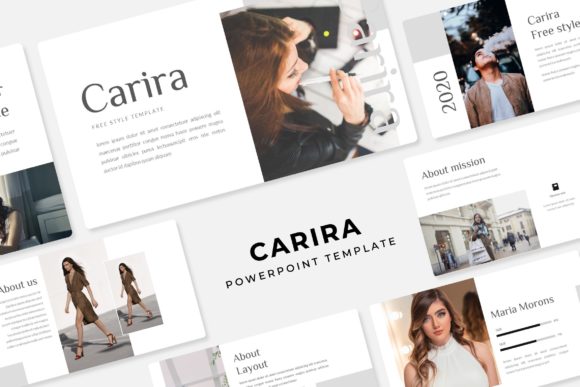
Carira Power Point Template: A Practical Framework for Streamlined Presentation Workflows
Presentations are rarely the main event. They support a pitch, a lesson, a report, or a strategic conversation. The template you choose should reduce friction, not add complexity. The Carira Power Point Template is designed with this principle in mind, offering 150 total slides across 5 premade color variations, with 30 slides per template. But beyond the numbers, what matters is how this resource fits into the way you plan, build, and deliver presentations.
This article walks through practical workflows, integration points, and implementation considerations for professionals, creators, entrepreneurs, marketers, educators, and anyone who needs to produce consistent, high-quality slides without reinventing the wheel each time.
Understanding the Structure: 150 Slides Across 5 Color Variations
The Carira package includes 5 separate PPTX files, each with a distinct color scheme. Each file contains 30 slides, giving you a total of 150 unique slide layouts. This structure matters because it separates the decision about content from the decision about aesthetic. You can choose a color variation early in your process and stick with it, or you can experiment across versions during the planning phase.
All slides are built on master slides, which means any global change you make to fonts, spacing, or background elements propagates consistently across the entire deck. This is a significant time-saver when you need to adapt a presentation for a different audience or branding guideline.
What Each Template Includes
- 5 PPTX files (widescreen format)
- 5 premade color variations, 30 slides each
- Handcrafted infographics and section break slides
- Gallery and portfolio slide layouts
- Resizable and editable graphics with picture placeholders
- Drag-and-drop image insertion
- Pixel-perfect illustrations
The picture placeholders are worth special attention. They are pre-formatted frames that accept drag-and-drop images. Instead of manually cropping and resizing every photo, you drop your image into the placeholder, and the template handles the alignment. This is especially useful when you are working with a team or under a tight deadline.
How Carira Fits Into the Presentation Workflow
A typical presentation project passes through three broad phases: planning and structure, content creation, and refinement. The Carira template can be introduced at any point, but its value changes depending on when you bring it in.
Before the Project: Structuring Your Narrative
If you start with the template during the planning phase, you can use the section break slides and infographic layouts to map out your story before writing a single line of copy. Open one of the 5 PPTX files, browse through the 30 slides, and identify which layouts correspond to the sections you need. This gives you a visual outline that you can share with stakeholders early in the process.
For example, if your presentation requires a timeline, a comparison chart, and a portfolio showcase, you can mark those specific slides in the template and build your content around them. This approach reduces the risk of creating slides that don't fit the available layouts.
During Content Creation: Efficient Assembly
Once your narrative is ready, the drag-and-drop picture placeholders and editable graphics allow you to assemble slides quickly. The handcrafted infographics are particularly useful for presenting data or processes without needing to design from scratch. You can customize colors, resize elements, and adjust text without worrying about breaking the layout.
The pixel-perfect illustrations ensure that when you resize or move elements, they remain sharp and aligned. This is a common pain point in PowerPoint templates, and Carira addresses it by keeping all vector assets properly constructed.
After the Project: Adaptation and Reuse
One of the strongest arguments for investing in a well-structured template is reuse. Because Carira includes 5 color variations, the same content can be adapted for different clients, departments, or branding guidelines. If you maintain a presentation for a quarterly review, you can switch the color scheme without reworking the entire deck.
The master slide foundation also means that if you need to update fonts or adjust margins later, you make the change once, and it applies everywhere. This is especially valuable for organizations that produce recurring presentations.
Practical Integration With Other Tools and Resources
Templates do not exist in isolation. The way you integrate Carira with your existing workflow determines whether it saves time or adds friction.
Font Management
The template uses a specific font, and the download includes a link to the free font resource. Before you start building slides, download and install the font on your system. This ensures that the typography renders correctly from the first slide you edit. If you prefer to use a different font, the master slides make it easy to swap all text styles at once.
Image Sourcing
The preview images shown in the template are for illustration purposes only and are not included in the package. Plan your image sourcing accordingly. Use stock photo services, your own photography, or design assets that match the color palette of the selected template variation. The picture placeholders are sized to common aspect ratios, so selecting images that fit those dimensions reduces cropping work.
Collaboration With Teams
If you work with a team, decide early which color variation and slide set to use. Share the relevant PPTX file with collaborators so everyone edits the same version. Because the template relies on master slides, team members who understand the basics of PowerPoint can contribute without accidentally breaking the design.
Marketers and Content Creators
For a product launch or campaign presentation, the gallery and portfolio slides allow you to showcase visuals prominently. The section break slides help separate different stages of the campaign strategy. Use the infographic layouts to summarize audience research or performance metrics. The drag-and-drop placeholders let you swap product images in minutes.
Educators and Trainers
When building course materials, consistency across modules is critical. Choose one color variation for the entire curriculum. Use the section break slides to mark module transitions, and the infographic layouts to explain processes or frameworks. Because the template includes 30 slides per color, you have enough variety to cover different lesson types without repeating the same layout.
Entrepreneurs and Small Business Owners
Pitch decks, investor updates, and client proposals all benefit from a clean, professional look. The resizable graphics and picture placeholders let you add your own screenshots, product photos, or team headshots without design effort. Having 5 color variations means you can customize a deck for each investor or client while maintaining the same structure.
Freelancers and Designers
If you produce presentations for clients, the Carira template gives you a reliable base that you can adapt quickly. The handcrafted infographics and pixel-perfect illustrations mean you spend less time troubleshooting layout issues and more time refining the content. The readme file included in the package explains the font and structure, making it easier to hand off the file to a client who wants to make future edits themselves.
Preparation and Setup
Invest 15 minutes upfront to set up your template properly. Install the font, choose your color variation, and review all 30 slide layouts so you know what is available. This familiarity pays off when you need to build a deck under time pressure.
Compatibility and File Management
The template is delivered as PPTX files, which are compatible with modern versions of PowerPoint. If you use PowerPoint for Microsoft 365, PowerPoint for Mac, or PowerPoint for the web, the features should work reliably. Keep the original files in a dedicated folder and make copies for each project so you always have a clean starting point.
Efficiency Through Reuse
Over time, you will develop a mental map of which slides work best for which scenarios. When you start a new presentation, open the relevant color variation and delete the slides you do not need. This is faster than building from scratch or searching through a large library of unrelated templates.
Quality Control
Because the template uses master slides, any branding or formatting updates you make are applied globally. This reduces the risk of inconsistent fonts, mismatched colors, or misaligned elements across a large deck. Always check a few slides after making global changes to confirm that the adjustments transferred correctly.
Observations on Practical Implementation
The 150 total slides might seem overwhelming at first, but the 30-per-color structure makes the set manageable. You are not expected to use every slide in a single presentation. Instead, the variety allows you to choose the best layout for each piece of content. Over time, you will develop a personal shortlist of go-to slides within your preferred color variation.
The handcrafted infographics are a standout feature because they reduce the need for external diagramming tools. For many common presentation needs such as timelines, process flows, or data summaries, the built-in graphics are sufficient. You can customize them by changing colors or resizing elements directly in PowerPoint.
The picture placeholders are especially useful when you work with non-designers. If a colleague needs to add an image, they can drag it into the placeholder without worrying about alignment or aspect ratio. This keeps the presentation looking polished even when multiple people contribute.
Making the Decision: Is This Template Right for Your Workflow?
Templates are tools, not solutions on their own. The Carira Power Point Template works best for anyone who produces presentations regularly and values consistency, speed, and professional output. If you frequently adapt the same content for different audiences, the 5 color variations give you flexibility without rework. If you collaborate with others, the master slide structure and drag-and-drop placeholders reduce errors.
For one-off presentations or projects with highly specific design requirements, a custom design might be more appropriate. But for recurring work such as monthly reports, client pitches, training materials, or marketing presentations, this template set provides a reliable, repeatable foundation.
The free font download link and the clear readme file make setup straightforward, even if you are not a PowerPoint power user. And because the template is built on master slides, you can scale your use over time as your needs become more complex.
Ultimately, the value of a template is measured by how much time it saves you and how consistently it helps you produce work that meets your standards. When evaluated that way, the Carira template set offers practical, everyday utility for a wide range of presentation tasks.