Anka Keynote Template: A Versatile Presentation Solution for Professional Use
When preparing a presentation that needs to convey professionalism, clarity, and visual appeal, the tools you choose can significantly influence the outcome. Among the many options available, the Anka Keynote Template has gained attention for its comprehensive structure and adaptable design. This article offers a balanced evaluation of what the Anka Keynote Template provides, who might benefit from it, and what practical considerations you should weigh before committing to it for your next project.
What Is the Anka Keynote Template?
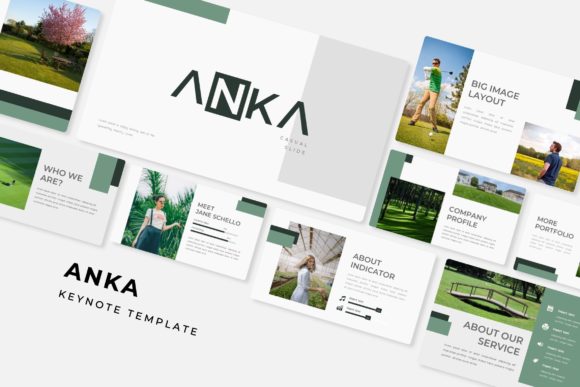
The Anka Keynote Template is a presentation theme built for Apple's Keynote software, designed to streamline the creation of slides that are both polished and functional. It includes a total of 150 slides distributed across five distinct color variations, with each variation offering 30 slides. These color presets allow you to choose a palette that aligns with your brand or the tone of your presentation without needing to adjust individual elements manually. The template also comes with handcrafted infographics, section break slides, gallery and portfolio layouts, and resizable, editable graphics. Picture placeholders support a drag-and-drop workflow, and the entire package is built on master slides, which helps maintain consistency as you edit.
Beyond the Keynote files themselves, the package includes five PPTX files for widescreen presentations, making it usable across different platforms. A readme file provides guidance on fonts, and a link to download the required free fonts is included. It is important to note that photographs shown in the preview are for illustration only and are not part of the template.
Why Consider the Anka Keynote Template?
If you frequently create presentations for business, education, creative portfolios, or client work, the Anka Keynote Template offers several structural advantages. The sheer number of slides gives you a starting point for a wide variety of content types, from data-heavy reports to image-focused galleries. The handcrafted infographics can save you significant time if you need to present statistics or processes visually, and the section break slides help organize longer presentations into clear, digestible segments.
Another reason to consider this template is its color flexibility. Having five premade color schemes means you can adapt the same base design to different projects or audiences without starting from scratch. This can be particularly valuable if you work with multiple clients or departments that require distinct visual identities. The inclusion of PPTX files also adds cross-platform utility, allowing you to open the template in PowerPoint if needed.
Benefits of Using a Structured Template Like Anka
One of the primary benefits of using a template such as Anka is the reduction in design time. Rather than constructing slides from a blank canvas, you begin with professionally arranged layouts that already incorporate typography, spacing, and color balance. The master slide foundation ensures that changes made at the master level propagate consistently across all slides, which is important for maintaining a cohesive look throughout long presentations.
The drag-and-drop picture placeholders simplify the insertion of images, making it easy to swap visuals without disrupting the layout. This is particularly useful for portfolios, case studies, or any presentation where imagery plays a central role. The resizable and editable graphics give you control over the final appearance, allowing you to adjust shapes, icons, and charts to match your specific content.
Another benefit worth noting is the inclusion of section break slides. These dedicated slides help audiences follow the narrative structure, especially in presentations that cover multiple topics or phases. They act as visual cues that signal transitions, which can improve audience comprehension and retention.
Tradeoffs and Practical Considerations
While the Anka Keynote Template offers clear advantages, it is not without tradeoffs. First, the template is designed around specific color schemes and layout arrangements. If your brand or project requires a highly unique visual language, you may find yourself making substantial modifications to the template, which could offset some of the time savings. The five premade colors provide variety, but they may not cover every brand palette or personal preference without adjustment.
Another consideration is the reliance on specific fonts. The template uses free fonts that you can download, but if you work in an environment where font installation is restricted, or if you need to share editable files with others, you may encounter compatibility issues. It is advisable to check font permissions and availability before starting a project that requires collaboration.
The template's 150 slides may also be more than you need for simpler presentations. If your goal is a short, straightforward deck with minimal visual elements, a lighter template might be easier to navigate. Having many slide options can sometimes lead to decision fatigue or overcomplication if you are not careful about which layouts you choose.
Additionally, the photographs used in the preview are not included. This means you will need to source your own images, which adds a step to your workflow. While this is standard practice for many templates, it is worth factoring into your planning, especially if you require high-quality visuals quickly.
Where the Anka Keynote Template Excels
The Anka Keynote Template is a strong fit for users who regularly produce presentations that require a balance of visual appeal and content density. It works well for business proposals, annual reports, marketing pitches, educational lectures, and creative portfolios. The gallery and portfolio slides are particularly useful for designers, photographers, architects, and other visual professionals who need to showcase work in an organized, attractive manner.
The template also suits teams or individuals who value consistency across multiple presentations. If you need to maintain a uniform look for a series of decks such as monthly reports, client updates, or training modules the master slide structure and color variations help enforce design standards without requiring repeated manual effort.
Another scenario where Anka performs well is when you need to present data alongside narrative content. The handcrafted infographics give you a head start on visualizing metrics, comparisons, and processes, which can be difficult to design from scratch if you are not experienced with graphic design.
When Alternatives May Be Worth Considering
If your presentation needs are minimal such as a short internal update or a quick pitch deck a simpler template with fewer slides may be more efficient. In those cases, a lightweight design reduces the time spent browsing layouts and editing out unnecessary elements.
If you require extremely high customization or a brand-specific design that differs significantly from the template's aesthetic, hiring a designer or building a custom template might give you better results. While Anka offers flexibility, it is still a predefined structure, and some users may prefer complete control over every design element.
Collaborative environments where multiple people edit the same presentation may also present challenges. Keynote's collaboration features work best when formatting is consistent, but if team members are not familiar with master slides or template conventions, they may inadvertently disrupt the layout. In such cases, a simpler, more robust template or a different tool altogether might reduce friction.
Finally, if you do not have access to Keynote or PowerPoint, or if you prefer web-based presentation tools like Google Slides, the Anka template will not be directly usable without conversion, which can introduce formatting inconsistencies. Always verify that the file format works within your preferred environment before committing to a purchase.
Decision-Making Insights for Prospective Users
To determine whether the Anka Keynote Template aligns with your needs, start by assessing the following factors:
- Presentation frequency and volume: If you create presentations regularly and need a reliable structure, the investment in a comprehensive template can pay off over time.
- Design skill level: If you are comfortable with minor edits but prefer not to design from scratch, Anka offers a middle ground that requires minimal design expertise.
- Content variety: If your presentations include a mix of text, data, images, and sections, the diverse slide types will serve you well.
- Brand requirements: Compare the five color schemes against your brand palette or project theme. If a close match exists, the template will save time. If not, consider the effort needed to recolor elements.
- Collaboration needs: Think about who else will edit the presentation. Ensure they are comfortable working with master slides and template-based structures.
- Deliverable format: Confirm that the audience or client expects a Keynote or PowerPoint file. If PDF or a web-based format is preferred, the template's formatting may not transfer perfectly.
A practical approach is to start with a single project using the Anka Keynote Template before scaling its use across all your presentations. This allows you to evaluate how well it fits your workflow, how much time it actually saves, and whether the final output meets your quality standards. Many users find that the combination of premade colors, infographics, and slide variety reduces preparation time significantly, but individual experiences vary based on the specific demands of each project.
Final Thoughts on the Anka Keynote Template
The Anka Keynote Template is a well-rounded option for anyone who needs to produce professional presentations efficiently. Its 150 slides, five color variations, handcrafted infographics, and master slide structure offer a foundation that balances flexibility with ease of use. While it may not suit every project especially those with highly specific branding or very simple content requirements it provides a practical starting point for a wide range of professional scenarios.
By understanding what the template includes, where it excels, and where its limitations lie, you can make an informed decision about whether it is the right tool for your next presentation. As with any design resource, the best choice depends on your content, your audience, and the constraints of your working environment. For many users, the Anka Keynote Template strikes a useful balance between polish and practicality.