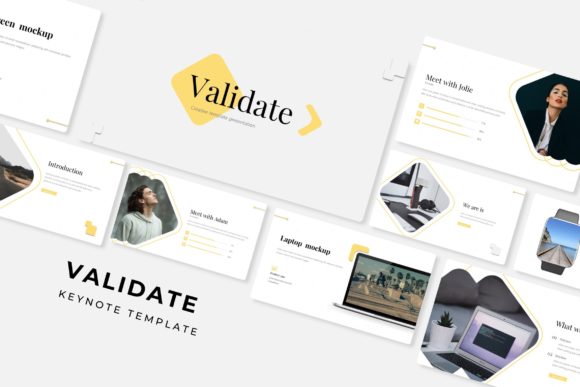
Validate Keynote Template: A Versatile Presentation Toolkit for Professionals
Presentation templates are easy to come by. What is harder to find is a template system that actually speeds up your workflow, adapts to different brand needs, and still looks polished when you present to clients or colleagues. The Validate Keynote Template attempts to solve precisely that problem. Built around a substantial 150-slide architecture with five complete color variations, this template set aims to be a go-to resource for anyone who needs professional slides fast.
What Makes Validate Keynote Template Different
The core idea behind Validate is modularity paired with volume. Instead of giving you one deck with a handful of slide layouts, Validate provides five separate Keynote files, each with its own color scheme. Every file contains 30 slides, bringing the total to 150 slides across the full set. That means you are not stuck reusing the same orange accent on every slide just because the template only came with one option.
The five premade color variations are designed to cover a reasonable range of industries and presentation contexts. Whether you are pitching to a conservative corporate board, presenting at a creative industry event, or building an internal training deck, having those distinct palettes ready to go reduces the time spent fiddling with theme colors. Each variation carries its own visual identity while maintaining consistent layout logic throughout the set.
Handcrafted Infographics and Section Breaks
A noticeable strength of the Validate package lies in its infographic elements. The description highlights handcrafted infographics built directly into PowerPoint, but since this is a Keynote template, those same visual assets carry over into the Apple ecosystem with proper fidelity. Infographics are often the weak point in presentation templates. You either get generic charts that require heavy customization, or you get decorative graphics that serve no real purpose. Validate attempts to strike a balance by providing infographic components that are both purposeful and editable.
Section break slides are another practical inclusion. Any presentation longer than ten slides benefits from clear visual transitions between topics. Validate includes dedicated section break slides that allow your audience to mentally reset between segments. This may seem like a small detail, but for longer presentations, quarter-day workshops, or client reviews, these transitions make a noticeable difference in audience retention.
Gallery and portfolio slides are also part of the package. If you showcase work samples, case studies, or team member profiles, these layouts give you a consistent frame for images and brief captions. The gallery slides are structured to work well for both product photography and conceptual work, making them useful for creative professionals and agencies.
Resizable Editable Graphics and Picture Placeholders
One of the more practical features in Validate is the drag-and-drop picture placeholder system. Instead of manually cropping and positioning every image, you drop your photo into the designated placeholder area, and the template handles the sizing and alignment automatically. This is not a revolutionary concept, but it is executed in a way that actually saves time during real-world deck assembly.
All graphics are resizable and editable. Not all template vendors allow you to scale elements without breaking alignment or losing quality. Validate uses vector-based assets where applicable, so you can stretch, shrink, or reposition graphics without ending up with pixelated edges or distorted proportions. The illustrations are described as pixel-perfect, which in practical terms means they hold up on high-resolution Retina displays and projectors alike.
The template is built on master slides. For anyone who has spent time manually adjusting the same text box across thirty slides, the value of master slide architecture becomes immediately obvious. Change a font, color, or background element on the master slide, and it updates across every slide that inherits from that master. This is essential for maintaining consistency when you are working under tight deadlines.
Usability and Real-World Performance
When evaluating a template of this scale, the question is rarely does it look good in preview images. The real question is does it hold up when you actually use it. Validate performs reasonably well in this regard, but it is worth noting a few practical considerations.
First, because the package includes five separate PPTX files (compatible with Keynote), you need to decide upfront which color variation you want to work with, or else you may find yourself copying slides between files more often than ideal. The files are widescreen format by default, which matches modern projector and monitor standards. If you need standard 4:3 format, you would need to resize, which may alter some layout proportions.
Second, the free font download link is a welcome inclusion but requires a few extra steps. You will need to install the fonts before you start editing, otherwise, Keynote will substitute system fonts and your layout may shift. The Readme file included in the package clarifies which fonts are used and where to download them, so the process is straightforward if you follow the instructions.
Who Benefits Most from Validate Keynote Template
Validate is not a niche template. Its feature set and volume make it broadly useful across several professional groups.
Freelancers and Independent Consultants
If you pitch to different clients in different industries, having five color variations ready to go means you are not reconfiguring a template from scratch every time you land a new project. You can grab the color scheme that best matches the client's branding and be editing within minutes.
Marketers and Content Creators
The gallery slides and infographic elements are directly useful for social media strategy decks, campaign recaps, and content calendar presentations. The drag-drop placeholders reduce the friction of inserting screenshots and visuals.
Educators and Trainers
Section break slides and structured layouts help workshop facilitators keep their audience oriented throughout longer training sessions. The template provides enough slides that you are not forced to reuse the same layout for every topic.
Small Business Owners
When you are already managing operations, customer relationships, and finances, building a professional deck from scratch is rarely a priority. Validate gives you a ready-made structure that only requires your content and images to be functional.
Agencies and Teams
Multiple team members can work within the same template system without diverging into inconsistent formatting. The master slide approach ensures that even if different people edit different sections, the final deck reads as cohesive.
Practical Strengths Worth Noting
The template includes a slide count that covers nearly any presentation scenario. With 30 slides per color variant and 150 in total, you are unlikely to run out of layout options, even for comprehensive decks. The infographic elements are positioned as handcrafted, which in practice means they avoid the generic clip-art look that many business templates still rely on.
Resizability and editability across all graphics is another genuine strength. Many templates lock certain elements, forcing you to keep them as-is or delete them entirely. Validate allows you to adjust sizing and positioning, giving you more control over the final look without requiring advanced design skills.
The picture placeholder system works well for people who are not experienced with masking or cropping in Keynote. It reduces the friction of inserting images to a simple drag and drop operation, which speeds up deck assembly notably.
Limitations to Consider
No template is perfect for every situation, and Validate has some limitations worth acknowledging.
The template is delivered in PPTX format for compatibility with both Keynote and PowerPoint. While this is practical for cross-platform use, some advanced Keynote-specific animations or transitions may not be included. If you rely heavily on Keynote cinematic transitions, you may need to add those manually.
Photographs are not included with the purchase. The product page explicitly states that all photographs and pictures shown in the preview are for illustration only. This is standard practice, but it means you will need your own image library or access to stock photography to fill the placeholders. For professionals who already maintain a photo library, this is not an issue. For someone expecting a fully populated deck, it may be an unexpected extra step.
Color variations are premade, which is convenient, but they are also fixed. If your brand colors do not align closely with any of the five provided themes, you will need to manually adjust the color palette. While the master slide structure makes this easier than editing individual slides, it still requires some effort.
Long-Term Value of the Template
Presentation templates tend to have a lifespan of somewhere between one and three years before they start feeling dated. Validate uses a clean, modern visual language that should age reasonably well. Sans-serif typography, restrained infographics, and generous white space are design choices that stay relevant longer than heavily stylized or trend-driven layouts.
The five color variations also extend the template's usable life. If you get tired of one palette, you can switch to another without buying a whole new template. That kind of built-in variety is rare in single-file templates and adds practical value for frequent presenters.
For teams, the consistency enforced by master slides means that decks produced six months apart will still look like they came from the same organization. That consistency matters more than most people realize, especially in client-facing work where brand perception is on the line.
Final Observations
Validate Keynote Template positions itself as a comprehensive presentation toolkit, and it largely delivers on that promise. The combination of five color variations, 150 total slides, handcrafted infographics, section breaks, gallery layouts, and editable master slides creates a resource that covers a wide range of professional presentation needs.
The template is best suited for professionals who present regularly, need to maintain visual consistency across multiple decks, and want to reduce the time spent on layout and design. It is less suited for someone who needs a fully animated, keynote-native template with custom transitions, or someone who expects ready-to-use photography.
If you value modularity, color flexibility, and a slide count high enough to handle complex presentations, Validate is a practical investment. It saves you from rebuilding layout structures repeatedly and gives you a solid foundation to focus on content, message, and audience engagement.