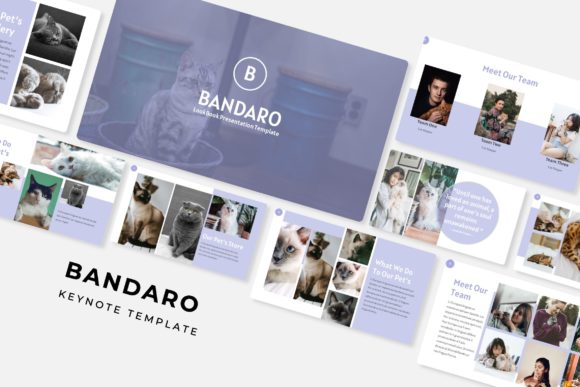
Bandaro Keynote Template: A Versatile Presentation Solution for Professionals
Presentations are a core part of professional communication, whether you are pitching to investors, reporting to stakeholders, or showcasing a portfolio. The challenge often lies in balancing visual appeal with efficiency. You need slides that are polished and persuasive, but you may not have hours to design from scratch. That is where the Bandaro Keynote Template steps in. Designed to save time while delivering high-quality results, this template offers an all-in-one package for anyone who creates presentations regularly. With 150 total slides spread across five pre-made color variations, it provides a flexible foundation that adapts to different branding needs and content types. In this article, we explore how Bandaro can help you overcome common presentation hurdles, and how different users can make the most of its features.
Understanding the Bandaro Keynote Template
The Bandaro Keynote Template is a comprehensive presentation toolkit built for Apple’s Keynote, but also includes PowerPoint-compatible files. It consists of five distinct templates, each with 30 slides, giving you a total of 150 slides to work with. Each template comes in five pre-made color variations, so you can choose a palette that aligns with your brand or project. Beyond slides, Bandaro includes handcrafted infographics, section break slides, and dedicated gallery and portfolio pages. The graphics are pixel-perfect illustrations, and every element is resizable and editable. Picture placeholders support drag-and-drop, making it easy to insert your own images. The templates are built on master slides, ensuring consistency when you add or edit content. In short, Bandaro aims to eliminate the friction between your ideas and a finished presentation, letting you focus on your message rather than layout details.
Common Presentation Challenges
Before diving into solutions, it is helpful to identify the pain points many professionals face when creating presentations. Time constraints are perhaps the most universal. You may have a tight deadline and need a deck that looks like it took days to craft. Another common issue is a lack of design expertise. Even with good content, poor visual hierarchy or mismatched colors can undermine your credibility. Brand consistency is another struggle—ensuring every slide uses the same fonts, colors, and spacing can be tedious. Finally, flexibility matters. A template that works for a quarterly report might feel stiff for a creative portfolio. Bandaro addresses each of these challenges directly, as we will see.
How Bandaro Helps You Overcome These Hurdles
The Bandaro Keynote Template is built with practical solutions in mind. Its 150 total slides give you a wide variety of layouts, so you are not stuck repeating the same structure. The five pre-made colors mean you can switch palettes instantly, whether you need a bold palette for a conference or a subdued one for a board meeting. The handcrafted infographics are particularly useful for presenting data without resorting to boring charts. You can customize these infographics to match your numbers, turning abstract statistics into compelling visuals.
Section break slides serve as natural pauses in your narrative, helping audiences follow along. They are especially helpful in longer presentations where you need to transition between topics. The gallery and portfolio slides are ready-made for showcasing work, which is a boon for designers, photographers, and agencies. The resizable and editable graphics mean you are not stuck with fixed icons or illustrations; you can scale, recolor, or rearrange them to fit your layout. Picture placeholders with drag-and-drop support simplify image insertion—no more fiddling with cropping or alignment.
Master slides are another time-saver. When you need to add a new slide, the template automatically applies consistent headers, footers, and background styles. This ensures your presentation remains cohesive even if you are collaborating with team members who have different editing styles. The included readme file provides clear instructions, and the free font download link helps you maintain the intended typography. All of these features combine to reduce the cognitive load of designing slides, letting you concentrate on substance.
Practical Applications and Use Cases
The Bandaro template is versatile enough for various professional scenarios. Consider a startup founder preparing a pitch deck. You need to convey your business model, market opportunity, team credentials, and financial projections in a compelling way. Bandaro’s infographics can illustrate growth projections, while the portfolio slides can showcase product screenshots or team photos. The section breaks help you move from the problem to the solution smoothly. With five color variations, you can choose a palette that matches your brand, making the deck feel custom-built.
For a marketing manager creating a campaign report, Bandaro offers layouts for key metrics, case studies, and competitor analysis. The infographics can turn engagement rates into clear visuals, and the gallery slides can display ad creatives. Because the template is based on master slides, you can insert recurring elements like logos and disclaimers without manual copying. This consistency is particularly valuable when presenting to executives who notice details.
Freelancers and agencies will appreciate the portfolio slides. Whether you are a web designer, photographer, or consultant, you need to display your work elegantly. Bandaro’s gallery layouts let you arrange images in grids or carousels, and the picture placeholders ensure images stay sharp. The section break slides can separate different service categories or project types. And because the graphics are pixel-perfect, your portfolio will look professional on both screen and print.
Corporate trainers and educators can also benefit. Long training modules require clear segmentation, and Bandaro’s section breaks provide logical pauses. The infographics can simplify complex concepts, and the editable graphics allow you to create custom diagrams. The five color variants let you match your organization’s branding or use color coding for different modules.
Different Users, Different Approaches
Not everyone uses a template the same way, and Bandaro accommodates varying levels of design skill and customization depth. For a novice who wants a quick, polished result, the simplest approach is to pick a color variation and a slide layout, then drop in your text and images. The master slides handle the rest. You can complete a 20-slide deck in under an hour without touching any advanced settings.
An intermediate user might want to customize the template further. You can adjust the color palette beyond the five pre-sets, or swap out icons for your own vector graphics. The resizable elements make it easy to rearrange slides without breaking the layout. You might also use the infographics as a starting point, editing them to reflect your specific data. The readme file guides you through font installation and basic adjustments.
Advanced users, such as professional designers, can treat Bandaro as a flexible framework. They can deconstruct the master slides, modify animations, or create new slide masters based on the existing ones. Because the illustrations are pixel-perfect and vector-based, they scale cleanly for large screens or print. Advanced users can also combine multiple color variations into one deck by copying slides between the different PPTX files, though this requires careful attention to consistency. The template’s structure rewards experimentation, but even complex customizations are supported by the clean base.
Recommendations for Best Results
To get the most out of the Bandaro Keynote Template, start by reviewing all 150 slides in the file. Familiarize yourself with the different layouts: title slides, content slides, section breaks, infographics, and portfolio pages. This helps you plan your narrative flow. Next, choose a color variation that aligns with your brand or the mood you want to set. The five options cover a range from neutral to vibrant, so you likely will find a suitable match. If not, you can manually recolor elements using Keynote’s or PowerPoint’s tools.
Use the section break slides strategically. They work as chapter dividers, giving your audience a moment to absorb information before moving on. Avoid overusing them—one per major section is plenty. When inserting your own images, use high-resolution photos and ensure they are cropped appropriately before dragging into the placeholders. The drag-and-drop feature works well, but pre-cropping saves time. For the infographics, edit the data directly rather than pasting a chart from Excel. The handcrafted look will stand out more than a standard chart.
If you are sharing the presentation with colleagues who use different software, note that Bandaro includes five PPTX files (PowerPoint) as well as Keynote versions. The widescreen format (16:9) is standard for most projectors and screens. Make sure everyone installs the recommended free font to preserve typography. The readme file includes the download link.
What’s Included and What’s Not
When you purchase the Bandaro Keynote Template, you receive five PPTX files (one for each color variation), each containing 30 slides (total 150 slides). All files are in widescreen format. You also get a readme file with instructions and a link to download the free font used in the design. The templates are fully editable, and the illustrations are pixel-perfect and resizable. Picture placeholders are set up for easy drag-and-drop insertion. It is important to note that the photographs or pictures shown in the preview are for illustration only and are not included. You will need to supply your own images. This is standard for most presentation templates, as including stock photos would increase cost and licensing complexity. Plan to use your own photos or purchase royalty-free images separately.
Final Thoughts
The Bandaro Keynote Template solves real problems for busy professionals. It gives you a robust set of tools to create presentations that are visually cohesive, data-friendly, and flexible. Whether you are a startup founder, marketer, freelancer, or educator, you can adapt the template to your specific needs without learning complex design software. By handling the layout and styling, Bandaro frees you to focus on your content and delivery. For anyone who wants to improve their presentation quality without spending excessive time on design, this template is a practical investment.