LinkedIn Social Media Mockups Pack: Preview Your Company Page Before You Publish
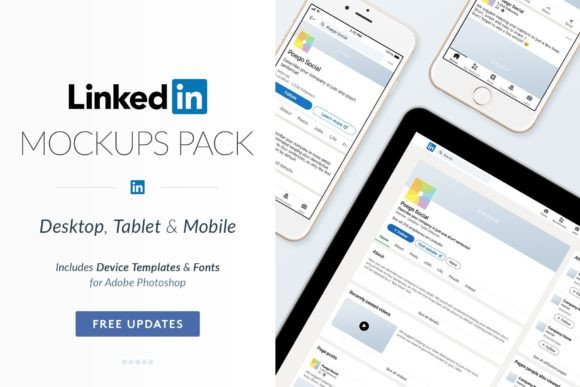
When you are building a brand presence on LinkedIn, every detail matters. Your Company Page is often the first place potential clients, partners, and talent go to learn about your business. But designing that page can feel like a guessing game. You might have a clear vision for how you want your page to look, but until you see it in a realistic format, it is hard to know if that vision actually works. That is where the LinkedIn Social Media Mockups Pack comes in. This set of professional templates lets you mock up your perfect Company Page in seconds, giving you a realistic preview of everything from the header to the footer before you ever hit publish.
For anyone responsible for a brand's LinkedIn presence, the gap between planning and execution can be frustrating. You might spend hours tweaking a banner image, only to realize it does not align well with your profile photo when viewed on a desktop. Or you might finalize a post layout, but then wonder how it will appear in a feed. The LinkedIn Social Media Mockups Pack removes that uncertainty. It provides full-length page mockups for desktop, tablet, and mobile, so you can see exactly how your content will look across devices. That means fewer surprises and more confidence when you go live.
Why visualizing your LinkedIn page matters
LinkedIn is a professional network, but it is also a visual platform. Your Company Page, Showcase pages, and shared content all compete for attention in a busy feed. A polished, consistent look builds trust and makes your brand look established. But achieving that polish requires testing. You need to see how your logo, cover image, and button placements work together. You need to check if your post images are cropped correctly and if your text overlays are readable. Without a mockup, you are essentially flying blind.
Many marketers and business owners run into the same challenges. They create assets in isolation, only to find they do not fit the LinkedIn format. They waste time uploading, previewing, and re-uploading files. Or they skip the testing step entirely and end up with a page that looks disjointed. The LinkedIn Social Media Mockups Pack solves this by giving you a realistic canvas to work with. You can place your design elements into pre-built templates that mirror the actual LinkedIn interface. That way, you catch alignment issues, color conflicts, and sizing problems early, when they are easy to fix.
How the mockup pack helps you work smarter
The core value of the LinkedIn Social Media Mockups Pack is that it saves you time and reduces guesswork. Instead of creating your own mockups from scratch, you get a library of high-resolution vector files that are easy to resize and customize. Whether you are working on a web design, a video storyboard, or a printed proposal, these templates adapt to your format. The pack includes everything from the Company Page home screen to the Posts page, Showcase pages, and more. You get a complete visual toolkit.
One of the biggest time savers is the inclusion of quick mockups for Canva and Photoshop. Not everyone is a design expert. If you use Canva, you can jump straight into editing without worrying about layer management or file formatting. For Photoshop users, the templates are meticulously organized with labeled layers. You can change text, swap images, and adjust icons without hunting through a messy file. That means you can produce a polished mockup in minutes, not hours.
The pack also includes pixel-perfect image guides. These guides help you understand exactly where your visuals will appear in the LinkedIn interface. You will know the safe zones for your cover image, the ideal dimensions for your profile photo, and how your post images will be cropped. This level of detail is especially valuable if you are designing for a client who expects accuracy. When you present a mockup that looks like a real LinkedIn page, your client instantly understands the final result. There is no need to explain what the live version will look like, because you are showing them.
Practical applications for different users
The LinkedIn Social Media Mockups Pack is versatile enough to serve a wide range of users. Let us look at a few common scenarios.
Marketing managers and brand strategists often need to present page redesigns to stakeholders. Instead of describing changes in a meeting, you can show a full-length desktop mockup. You can walk through the header, the featured section, and the posts feed. Your team can see the new color palette and typography in context. This makes approvals faster and reduces back-and-forth. You can also create multiple mockups to compare different design directions, helping the group reach a decision based on visuals, not guesswork.
Social media agencies and freelancers manage multiple clients with different brand guidelines. Keeping track of all those specifications can be exhausting. With the pack, you can create a master template for each client and reuse it for every campaign. When you need to show a new post design or a Showcase page update, you open the relevant template, drop in the new content, and export a realistic preview. This consistency helps your clients feel confident that their brand is being handled professionally. It also positions you as someone who pays attention to detail.
Content creators and video producers often need mockups for storyboards or client proposals. If you are pitching a LinkedIn video series, you can show exactly how the video will appear in the feed, both on desktop and mobile. The tablet and mobile mockups are particularly useful here. Many decision-makers view LinkedIn on their phones, so showing a mobile preview helps them understand the user experience. The pack includes responsive templates, so you can demonstrate how your content adapts to different screen sizes.
Entrepreneurs and small business owners who manage their own LinkedIn presence can also benefit. You might not have a design background, but you still want your page to look professional. The quick mockups for Canva make it easy. You can start with a pre-built template, add your logo, choose your colors, and upload a cover image. In a few clicks, you have a realistic preview of your page. You can even share that preview with a colleague or mentor for feedback before making the page live. This removes the anxiety of launching something that might look off.
Recommendations for getting the most out of the pack
To make the LinkedIn Social Media Mockups Pack work for you, start by identifying your most common use case. If you frequently design post images, focus on the Posts page templates first. If you are redesigning your entire Company Page, begin with the desktop home page mockup. Work through the templates one at a time rather than trying to use everything at once. This keeps the process manageable and helps you learn the file structure.
Take advantage of the free updates for life. As LinkedIn updates its interface, the pack is updated to match. That means you do not have to worry about your mockups becoming outdated. When a new layout or feature appears, you will have a template that reflects the current design. This is especially important for agencies that want to present accurate previews to clients.
Use the PDF user guide that comes with the pack. It walks you through the file organization, the layer naming conventions, and the recommended workflows. Even if you are experienced with design software, the guide can help you find specific elements faster. It also includes tips for exporting your mockups for web, video, or print, so you always get the right resolution.
Consider creating a library of approved mockups for your brand. Once you have designed your ideal Company Page and Showcase pages, save those files as your master templates. When you need to create a new post or update your profile, you can reference those files to ensure consistency. This turns the mockup pack into a long-term brand asset, not just a one-time tool.
Outcomes you can expect
When you integrate the LinkedIn Social Media Mockups Pack into your workflow, the most immediate outcome is reduced friction. You spend less time troubleshooting layout issues and more time focusing on content and strategy. Your designs look more polished because you have tested them in a realistic environment. Your clients and stakeholders feel more confident because they can see exactly what the final page will look like.
Over time, you build a more consistent brand presence on LinkedIn. Your posts, your Company Page, and your Showcase pages all work together visually. This consistency signals professionalism and reliability to everyone who visits your page. It also makes your content more recognizable in the feed, which can improve engagement.
Another outcome is better collaboration. When you share a mockup with a teammate or client, you give them a concrete reference point. They can point to specific elements and say, "Let's move this button up," or "Can we try a different font here?" That kind of feedback is much more productive than abstract discussions about what the page might look like. The mockup becomes a shared visual language that speeds up the review process.
Final considerations
The LinkedIn Social Media Mockups Pack is a practical resource for anyone who wants to present their LinkedIn presence with confidence. It addresses a common pain point: the difficulty of visualizing a digital page before it goes live. By offering full-length, high-resolution templates for desktop, tablet, and mobile, it covers the full range of viewing experiences. The editable files, quick mockups for popular tools, and organized layers make it accessible to both design professionals and non-designers alike.
If you are tired of uploading files only to find they do not fit, or if you want to impress clients with accurate previews, this pack is worth exploring. It removes the guesswork and gives you a clear path from concept to finished page. Whether you are a solo entrepreneur or part of a large agency, the time you save on testing and revisions will let you focus on the work that really matters: building a strong brand on LinkedIn.