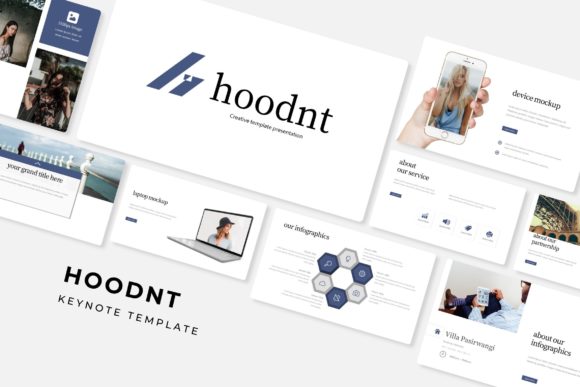
Understanding the Hoodnt Keynote Template: A Comprehensive Guide to Presentation Design
In today's fast-paced digital world, effective communication often hinges on the quality of your visual storytelling. Whether you are pitching to investors, teaching a classroom of students, or presenting quarterly results to your team, the tools you use to convey your message can make the difference between engagement and indifference. Among the many presentation resources available, the Hoodnt Keynote Template has emerged as a versatile and robust solution for professionals and creatives alike. This article explores everything you need to know about this template, its features, its practical applications, and how it can elevate your presentations to a professional standard.
What Is the Hoodnt Keynote Template?
The Hoodnt Keynote Template is a premium, multi-purpose presentation template designed for Apple's Keynote software, though it also includes compatible formats for PowerPoint (PPTX). It is built to help users create visually compelling slides without requiring advanced design skills. With a total of 150 slides organized into five distinct color variations, each containing 30 slides, this template offers a structured yet flexible foundation for a wide range of presentation needs.
At its core, the Hoodnt template is about efficiency and aesthetics. It provides pre-designed layouts, infographics, section breaks, gallery slides, and portfolio pages that you can customize to suit your specific content. The template is built on master slides, meaning any changes you make to the master slide automatically update across all related slides, saving you hours of repetitive work.
Key Features at a Glance
To fully appreciate what the Hoodnt Keynote Template offers, it helps to break down its most notable features. These elements work together to provide a seamless presentation-building experience.
- 150 Total Slides: A massive library of slide layouts covering virtually every presentation scenario you might encounter.
- 5 Premade Color Variations: Five distinct color schemes, each applied to a full set of 30 slides, giving you flexibility without extra design work.
- Handcrafted Infographics in PowerPoint: Professionally designed infographic elements that are easy to edit and adapt to your data.
- Section Break Slides: Dedicated slides to mark transitions between topics, enhancing narrative flow.
- Gallery and Portfolio Slides: Layouts specifically designed to showcase images, projects, or case studies.
- Resizable and Editable Graphics: All visual elements are fully customizable—resize, recolor, or reposition anything without quality loss.
- Picture Placeholder with Drag-and-Drop: Simply drag your images into placeholders, and the template handles the rest, ensuring consistent sizing and positioning.
- Based on Master Slides: Change the look of your entire presentation by editing just one slide, thanks to master slide architecture.
- Pixel-Perfect Illustrations: Every graphic is crafted with precision, ensuring crisp output on any screen or print medium.
Why Presentation Templates Matter in Modern Work and Business
You might wonder: why invest in a template when you could build slides from scratch? The answer lies in the psychology of visual communication. Research consistently shows that audiences retain information better when it is presented with clear, attractive visuals. A well-designed template does more than save time—it establishes credibility, reinforces your brand, and guides your audience's attention to what matters most.
In business contexts, a polished presentation can influence decisions. Investors, clients, and stakeholders often judge the professionalism of a proposal by its visual delivery. Similarly, educators use presentation design to simplify complex concepts and keep students engaged. The Hoodnt Keynote Template addresses these needs by offering structured layouts that balance creativity with clarity.
Moreover, in the age of remote work and virtual meetings, your slides often represent your only visual aid. A template like Hoodnt ensures that your message remains clear and impactful, even when delivered through a screen.
Exploring the Five Color Variations
One of the standout features of the Hoodnt template is its inclusion of five premade color variations. Each variation is a complete 30-slide deck with a unique color palette. This means you are not limited to a single look—you can choose the scheme that best fits your brand, your audience, or the mood of your presentation.
For example, a corporate pitch might benefit from a sleek, monochromatic scheme with navy and silver tones, while a creative portfolio could shine with a vibrant, contrasting palette. The color variations are applied consistently across all slide types, including infographics, section breaks, and gallery pages. You can also mix and match elements from different variations if you prefer a custom hybrid.
This flexibility is particularly valuable for agencies or freelancers who produce presentations for multiple clients. Instead of starting from scratch each time, you can select a color variation that aligns with the client's brand and then fine-tune it as needed.
The Power of Handcrafted Infographics
Infographics are one of the most effective ways to present data, but designing them from scratch can be daunting. The Hoodnt template includes handcrafted infographic slides that are ready to use. These are not generic charts—they are thoughtfully designed visuals that combine icons, typography, and color to tell a story with your numbers.
Whether you need to show a timeline, a process flow, a comparison, or a statistical breakdown, the infographic slides provide a strong starting point. Because they are fully editable, you can adjust the text, colors, and shapes to match your specific data. This is especially useful for professionals who need to present complex information in an accessible way, such as analysts, marketers, or educators.
Section Breaks, Galleries, and Portfolios: Structuring Your Narrative
A great presentation is more than a collection of slides—it is a story with a beginning, middle, and end. The Hoodnt template supports this narrative structure with dedicated section break slides. These slides serve as visual punctuation, signaling to your audience that you are moving to a new topic. They help maintain engagement and provide a natural rhythm to your presentation.
For creative professionals, the gallery and portfolio slides are particularly valuable. Whether you are a photographer, designer, architect, or artist, showcasing your work in a clean, consistent layout enhances its impact. The gallery slides use image placeholders that allow you to drag and drop your visuals, ensuring that every image is displayed at its best without manual resizing.
These features make the Hoodnt template suitable not only for business presentations but also for creative portfolios, project proposals, and educational modules.
Resizable, Editable, and Pixel-Perfect Graphics
One common frustration with presentation templates is the lack of flexibility. You might find a layout you love, but if the graphics are fixed or low-resolution, your final presentation can look amateurish. The Hoodnt Keynote Template addresses this with resizable and editable graphics that are pixel-perfect at any size.
All illustrations and icons are vector-based, which means they scale without losing quality. You can enlarge a graphic for a full-slide visual or shrink it to fit into a corner without worrying about pixelation. Additionally, every element is editable—you can change colors, adjust shapes, and rearrange components to suit your content.
This level of control is essential for designers and marketers who need to adhere to specific brand guidelines. It also empowers beginners to experiment with design without fear of breaking something.
Drag-and-Drop Picture Placeholders: Simplicity Meets Consistency
One of the most user-friendly features of the Hoodnt template is its drag-and-drop picture placeholders. Instead of manually cropping, resizing, and positioning every image, you simply drag your photo into the designated placeholder. The template automatically adjusts the image to fit the frame, maintaining consistency across your entire presentation.
This feature is a huge time-saver, especially when working with multiple images. It ensures that all your visuals have a uniform look, which reinforces a professional aesthetic. Whether you are adding product photos, team headshots, or location shots, the template handles the heavy lifting.
What’s Included in the Download
When you purchase the Hoodnt Keynote Template, you receive a comprehensive package designed to give you everything you need to start creating immediately. Here is exactly what is included:
- 5 PPTX Files: Each file corresponds to one of the five color variations, so you can open and edit directly in PowerPoint.
- 5 PPTX Widescreen: All files are formatted for widescreen (16:9) displays, the standard for modern projectors and screens.
- 5 Premade Color Variations: As discussed, each variation offers a unique look, applied across 30 slides per file.
- Readme First File: A quick-start guide that walks you through setup, font installation, and customization tips.
- Font Used: The template uses a specific font to achieve its signature look. A free download link for that font is included, so you can install it at no extra cost.
It is important to note that all photographs or pictures used in the preview are not included. They are intended for illustration purposes only. This is standard practice for template providers, as the images shown in demos are often licensed separately. You are expected to replace them with your own images or use royalty-free stock photos. This clarification helps set realistic expectations and ensures you understand exactly what you are getting.
Practical Applications Across Fields
The Hoodnt Keynote Template is not limited to one industry or use case. Its versatility makes it valuable in many contexts:
- Business and Corporate: Use it for board meetings, investor pitches, quarterly reviews, and strategic plans. The clean layouts and infographics help you present data convincingly.
- Education and Training: Educators and trainers can use the template to create engaging lesson materials, workshop slides, and course overviews. The section breaks help organize content into digestible modules.
- Creative Portfolios: Photographers, designers, artists, and architects can showcase their work using the gallery and portfolio slides. The consistent formatting lets your images take center stage.
- Marketing and Sales: Create compelling sales decks, product launches, and campaign presentations. The drag-and-drop image placeholders make it easy to swap in product shots or mockups.
- Nonprofits and Community Organizations: Present your mission, impact data, and case studies in a professional light. The handcrafted infographics are especially useful for showing outcomes and statistics.
Common Misunderstandings and How to Avoid Them
As with any template, there are a few common misunderstandings that users sometimes encounter. Let's address them directly so you can get the most out of your Hoodnt experience.
Myth 1: The template is only for Keynote users.
While the name includes "Keynote," the download includes PPTX files, meaning it works seamlessly with Microsoft PowerPoint. Mac and PC users alike can benefit.
Myth 2: The images from the preview are included.
As mentioned earlier, the preview images are for demonstration only. Always check the product description to understand what assets come with your purchase.
Myth 3: Templates are rigid and hard to customize.
The Hoodnt template is built on master slides and vector graphics, making it highly flexible. Even if you have little design experience, you can easily change colors, fonts, and layouts.
Myth 4: You need expensive software to edit the template.
The PPTX files open in standard versions of PowerPoint, and the included readme file provides clear guidance. No advanced design tools are required.
Final Thoughts: Why the Hoodnt Keynote Template Stands Out
In a crowded market of presentation templates, the Hoodnt Keynote Template distinguishes itself through its depth, flexibility, and attention to detail. With 150 total slides, five handcrafted color variations, pixel-perfect graphics, and intuitive drag-and-drop features, it offers a complete solution for anyone who wants to create professional presentations efficiently.
Whether you are a seasoned presenter or someone who dreads designing slides, this template lowers the barrier to entry while raising the quality of your output. It respects your time by automating the tedious parts of design, and it respects your creativity by giving you full control over the final result.
By understanding what the template includes—and what it does not—you can set yourself up for success from the moment you download the files. Replace the placeholder images with your own, customize the colors to match your brand, and let the well-structured layouts carry your message home.
In the end, a great presentation is not just about the slides. It is about the story you tell and the confidence with which you tell it. The Hoodnt Keynote Template gives you the tools to tell that story beautifully.