How to Create a Standout 4th of July Campaign with Customizable Flyer and Social Media Templates
Independence Day is one of the most celebrated holidays in the United States. For businesses, community organizations, churches, and families, it's a prime opportunity to host events, connect with audiences, and build excitement. But to get people through the door—or to get them to engage online—you need more than just a date and a location. You need strong visual marketing that grabs attention and communicates your message at a glance. That's where a well-designed 4th of July flyer template or social media post template comes into play.
In this guide, we'll walk through everything you need to know about using an editable 4th of July flyer template for your Independence Day promotions. Whether you're planning a backyard barbecue, a community parade, a block party, or a business-sponsored celebration, a professional Independence Day celebration flyer template can save you time, money, and headaches. We'll explore what these templates are, why they work so well, how to edit them even if you've never used Photoshop before, and creative ways to get the most out of your marketing materials.
Why Visual Marketing Matters for 4th of July Events
In today's fast-paced digital world, people make snap decisions about what to read, click, and share. A compelling visual—like a high-resolution flyer or a bold social media graphic—can be the difference between a well-attended event and a quiet disappointment. The 4th of July is inherently visual: fireworks, flags, red-white-and-blue color schemes, and family-friendly imagery all evoke strong patriotic emotions. A thoughtfully designed flyer taps into that emotional energy and makes your event feel legitimate, exciting, and worth attending.
Using a template doesn't mean you're cutting corners. In fact, a high-quality editable PSD template gives you a professional starting point that you can personalize to fit your specific event. Whether you're promoting a small neighborhood gathering or a large community festival, a consistent, polished look helps establish trust and builds anticipation.
What Is a 4th of July Flyer Template and How Does It Work?
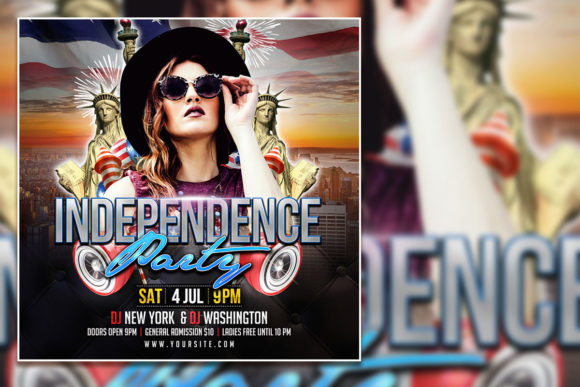
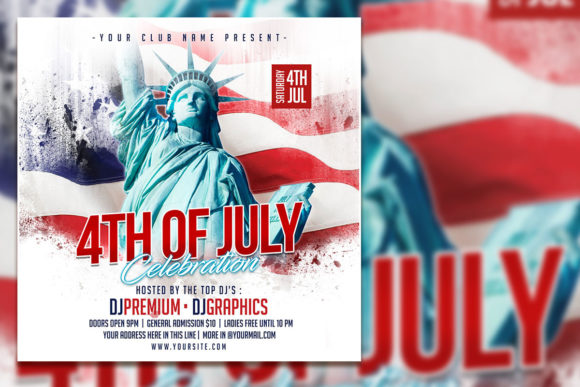
A 4th of July party flyer template is a pre-designed digital file that you can edit to suit your needs. Typically created in Adobe Photoshop, these templates come in a layered PSD format. That means every element—background, text, images, decorations, and logos—exists on a separate layer. You can turn layers on or off, move them around, change colors, and replace placeholder text and photos with your own content.
Most quality templates, like the one described here, offer the following specifications:
- Size: 2000 x 2000 pixels (a perfect square, ideal for both print and social media platforms like Instagram and Facebook)
- Resolution: 300 dpi (dots per inch), which ensures sharp, professional-looking prints
- Color mode: RGB, suitable for digital screens and modern printing processes
- File format: PSD (Photoshop document) with organized layers for easy editing
- Software: Adobe Photoshop (any recent version)
These templates are sold as instant downloads, so you can get started within minutes of purchase. They are fully editable—every piece of text and almost every visual element can be changed. If you want to use your own photo, you can replace the placeholder image with just a few clicks. This flexibility makes the template suitable for a wide range of events, from formal town celebrations to casual family picnics.
Key Features of a Well-Designed Independence Day Flyer Template
What makes a great template stand out from a generic one? Look for these qualities:
- Organized layers: Each element (background, text, images, shapes) is clearly labeled and grouped. This makes editing intuitive.
- Editable text: You can select any text layer with the text tool and type your own words. No need to hunt for hidden settings.
- Smart objects for images: Placeholder images are often set up as smart objects, meaning you can double-click to replace them without distorting the layout.
- Included fonts or font recommendations: Some templates include the fonts used; others tell you which free or premium fonts to download for a consistent look.
- Versatile color schemes: A patriotic palette (reds, whites, blues, with accents of gold or silver) that can be adjusted to match your brand or personal preference.
How to Edit a PSD Flyer or Social Media Template: A Step-by-Step Guide
You don't need to be a professional graphic designer to edit a 4th of July flyer template PSD. The process is straightforward, even for beginners. Here's a simple walkthrough:
- Open the file in Adobe Photoshop. If you don't have Photoshop, you can download a free trial from Adobe's website. The template will open with all layers visible in the Layers panel.
- Familiarize yourself with the layer structure. Look for groups labeled "Background," "Text," "Images," "Decorations," etc. Expand these groups to see individual layers.
- Replace the placeholder text. Select the Text tool (shortcut: T) from the toolbar. Click on any text in the document. The text layer will become active. Type your own event details: date, time, location, ticket info, contact information, or a short message.
- Change the font if desired. If you want a different typeface, select the text layer, then choose a new font from the Options bar at the top. The template's original fonts can be replaced with any font you have installed.
- Replace the photo. Find the layer or smart object that contains the placeholder image. Double-click its thumbnail. A new window will open. Place your own photo (make sure it's high resolution, at least 2000x2000 pixels for best results). Save and close that window. Your photo will now appear inside the template.
- Adjust colors and other details. Want a darker blue? A brighter red? Use adjustment layers like Hue/Saturation or Color Balance, or simply change the fill color of shape layers. Experiment—you can always undo (Ctrl+Z or Cmd+Z).
- Export your finished design. For social media, save as a JPG or PNG with maximum quality. For print, save as a high-resolution PDF or TIFF. Go to File > Export > Export As or Save As and choose your preferred format.
That's it. With just a few minutes of editing, you can go from a generic template to a personalized, professional-looking flyer that represents your event perfectly.
Creative Ways to Use Your 4th of July Template
One of the best things about an editable 4th of July flyer template is its versatility. The same base design can be repurposed across multiple channels. Here are some ideas:
Social Media Posts
Resize or crop the square 2000x2000 pixel design for Instagram, Facebook, Twitter, and LinkedIn. Post the flyer directly, or use it as a background for a short video teaser. Because the template is square, it works perfectly for Instagram posts and feed-friendly Facebook images.
Printed Flyers and Posters
Print the flyer at a local print shop or on your own printer. The 300 dpi resolution ensures crisp, professional results even at larger sizes. Distribute them at local businesses, community centers, libraries, and coffee shops.
Email Marketing
Attach the flyer to your email newsletter or embed it as an image in the body of the email. Include a clear call-to-action (e.g., "RSVP Now" or "Buy Tickets") right on the flyer.
Event Invitations
Send the flyer as a digital invitation via email, text, or social media direct message. You can also upload it to an online invitation platform and link to your event page.
Promotional Merchandise
Use elements from the flyer (like the flag motif or typography) on T-shirts, banners, tablecloths, or party favors. If you have the original PSD file, you can extract individual layers for use in other projects.
Tips for Customizing Your Template for Maximum Impact
To make your flyer feel truly unique, go beyond just swapping text and images. Here are some advanced customization ideas:
- Use your own high-quality photos. Replace stock images with real photos from past events, or snap new ones that capture the spirit of your celebration. A photo of your actual location, your team, or your community will make the flyer more authentic and relatable.
- Match your brand colors. If you're promoting a business or organization, adjust the flyer's color palette to align with your brand guidelines. Consistency builds recognition and trust.
- Incorporate your logo. Most templates have a space set aside for a logo. Insert your logo as a separate layer at full resolution. Keep it visible but not overwhelming.
- Play with typography hierarchy. Make sure your most important information (event name, date, location) stands out. Use size, weight, and color to guide the reader's eye.
- Keep it uncluttered. While it's tempting to include lots of information, a clean design is more effective. Stick to the essentials: what, when, where, and why someone should attend.
- Add a call-to-action. Tell people exactly what you want them to do: "Get Your Tickets Now," "RSVP by July 2," "Bring a Side Dish to Share," etc.
Common Questions and Misunderstandings About Using PSD Templates
Even though templates are designed to be user-friendly, some people hesitate because of a few common misconceptions. Let's clear them up:
- "I don't have design skills." That's the beauty of templates. The design work is already done for you. You just need to customize the text and images. If you can use a word processor, you can edit a PSD template.
- "I don't have Photoshop." While Photoshop is the standard, you can also use alternatives like Photoshop Elements, Affinity Photo, or even free tools like GIMP (though layer compatibility may vary). Many templates also include a JPG preview, but full editability requires software that supports PSD layers.
- "Templates look generic." Not if you personalize them. By changing the photo, colors, fonts, and text, you can make the design your own. Two people could start with the same template and end up with completely different-looking flyers.
- "It's too complicated to change the font." As noted in the instructions, you can select any text layer with the text tool and choose a different font from the dropdown. It's no more difficult than changing a font in Microsoft Word.
- "I need to use the exact fonts from the template." No, you can use any font you have installed. If you love the original font but don't have it, the template's description usually tells you the font name so you can download it (often free).
How Templates Fit Into Modern Marketing and Event Promotion
In today's business and community landscape, speed and consistency matter. Small business owners, volunteer organizers, and even families don't have the luxury of spending hours or days designing a single flyer from scratch. Templates fill that gap perfectly. They allow non-designers to produce professional-grade materials quickly, and they give designers a head start so they can focus on more creative work.
Moreover, using a cohesive set of templates—one for flyers, one for social media, one for email headers—ensures your event looks unified across all channels. This kind of brand consistency builds recognition and trust, whether you're promoting a business event or a neighborhood picnic. For 4th of July specifically, the patriotic theme is universal, so a well-made template can be used year after year with just minor updates to the date and details.
Final Thoughts: Making the Most of Your 4th of July Promotion
Independence Day is a time for community, celebration, and coming together. Your promotional materials should reflect that same spirit. A high-quality 4th of July party flyer template or Independence Day celebration flyer template is not just a pretty design—it's a practical tool that helps you reach more people, communicate clearly, and build excitement for your event.
By choosing an editable PSD template with organized layers, high resolution, and customizable text and images, you put yourself in control. You don't need to be a graphic designer to create something beautiful and effective. Just open the file, swap your details, and you're ready to share your event with the world—whether that's on social media, in print, or through email.
So go ahead: download your template, add your own photo, adjust the fonts to match your style, and get your 4th of July celebration the attention it deserves. With the right template in your hands, you'll spend less time designing and more time preparing for a fantastic Independence Day event.