Evaluating the Kotam Power Point Template for Professional Presentations
When evaluating presentation templates, the sheer volume of options can make it difficult to determine which one truly meets your workflow needs. The Kotam Power Point Template presents itself as a structured solution, distinguished primarily by its system of five distinct color variations built into a single set of 150 slides. For professionals, marketers, and educators who frequently build presentations, understanding the practical strengths and limitations of such a template is crucial before integrating it into a standard workflow. This article provides an objective evaluation of the Kotam Power Point Template, helping readers determine if its structure and specific features align with their particular presentation goals.
Defining the Kotam Power Point Template and Its Core Structure
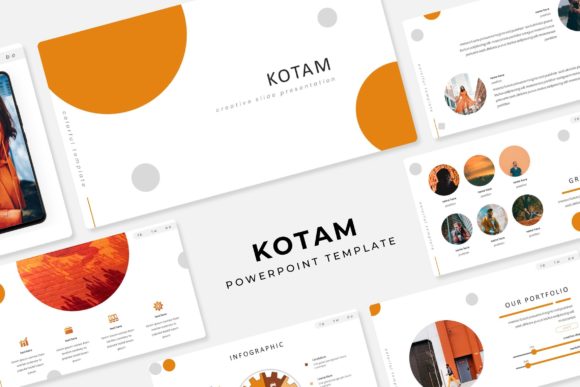
The Kotam Power Point Template is not a single slide deck but a coordinated system of five distinct templates, each featuring a unique premade color scheme. Within each color variation, users get 30 slides, totaling 150 slides overall. This structure is designed to provide extensive flexibility while maintaining strict design consistency across a brand or project. A key component of the template is its reliance on Master Slides. This means that global changes, such as fonts, backgrounds, and logos, can be applied across all slides within a specific color theme efficiently. The inclusion of handcrafted infographics, section breaks, and dedicated gallery and portfolio slides suggests a focus on visual storytelling and data presentation.
All graphic elements within the Kotam Power Point Template are described as resizable and pixel-perfect illustrations. Users can drag and drop images into picture placeholders, which streamlines the process of integrating visual content. It is important to note, however, that the stock photographs seen in previews are used for illustration purposes only and are not included with the purchase. The package includes five PPTX files in widescreen format, a readme file, and a link to download the required free fonts. Understanding exactly what is and is not included is a fundamental step in evaluating whether this template meets your requirements.
Versatility and Consistency
The five premade colors allow a user to switch between themes, such as corporate blue, creative orange, or minimalist gray, without redesigning slides from scratch. This is highly valuable for agencies or consultants who present to different clients with varied branding. The benefit here is clear: you get five distinct design systems for the price of one, and they all follow the same structural logic. This consistency reduces cognitive load on your audience and creates a polished, professional appearance across different presentations.
Efficiency and Workflow
The drag-and-drop picture placeholders and Master Slide structure significantly reduce the time spent on formatting. Users can focus on content rather than alignment and design elements. For someone who needs to produce a visually appealing deck quickly, this is a strong advantage. The handcrafted infographics are particularly useful for presenting data without needing to design charts from scratch. However, users unfamiliar with Master Slides may find the editing process initially confusing. Modifying elements incorrectly can break the formatting logic of the entire slide set, so there is a learning curve to consider.
Design Quality and Constraints
Pixel-perfect illustrations and handcrafted infographics offer a professional aesthetic that would otherwise require a graphic designer to produce. The visual quality of the slides is generally high, which can elevate the perceived professionalism of your content. On the other hand, while flexible within its structure, making radical alterations, such as changing the overall layout or adding non-template elements, might require more advanced PowerPoint skills. The Kotam Power Point Template excels when used within its intended framework, but users seeking fully customizable layouts may find the structure somewhat rigid. Another consideration is font dependency. The final look depends on users downloading and installing the correct free fonts. If a user cannot or does not do this, the design may fall back on standard fonts, altering the intended aesthetic.
Identifying Strong Fit Scenarios
The Kotam Power Point Template aligns well with specific use cases. For corporate branding and reporting, companies that need to maintain a consistent visual identity across quarterly reports, board meetings, and sales pitches will benefit from the pre-coordinated color systems and Master Slide functionality. The ability to maintain brand consistency across multiple presentations is a significant advantage for internal communications teams.
Creative agencies and freelancers also stand to gain from this template. The gallery and portfolio slides are tailored for showcasing work. The ability to quickly generate a 30-slide deck in a client's brand color is a significant time-saver. Similarly, business consultants and coaches who create data-driven decks will find the handcrafted infographics and clean content layouts useful for visualizing key performance indicators, strategies, and roadmaps. Finally, educators and trainers may appreciate the structured section breaks and clear content slides for organizing large amounts of information into digestible segments for their audiences.
Scenarios Where Alternatives May Be Worth Considering
No single template fits every situation. The Kotam Power Point Template may not be the optimal choice for users with hyper-specific brand guidelines. If an organization has extremely strict requirements regarding specific graphic elements, colors that do not match the five premade options, or proprietary typography, a fully custom designed template or a highly configurable alternative might be necessary. The predefined color variations, while useful, may not cover every brand identity.
Users seeking simplicity might also find this template overwhelming. Someone who wants a no-fuss presentation with minimal slides, such as a ten-slide startup pitch deck, might find the 150-slide system overly complex. In this case, a smaller, simpler template could be a better fit. Additionally, projects that require included media should factor in the extra cost and time of sourcing images elsewhere, since the Kotam Power Point Template does not include stock photography. Some competing templates include stock photos in their package, which could be a decisive factor for users without an existing image library.
Practical Decision-Making Insights for Prospective Buyers
To determine if the Kotam Power Point Template is the right tool for your needs, consider your existing workflow. If you typically build presentations from scratch or prefer modifying existing templates, the Master Slide structure of Kotam is a strong asset, provided you understand how to navigate it. Assess your comfort level with PowerPoint. Intermediate and advanced users will be able to leverage the full potential of the Master Slides and handcrafted elements, while beginners might need to invest time in learning the template's structure.
Evaluate your image resources as well. The template's quality heavily relies on the user's photography or graphics, since none are included. If you have access to suitable high-resolution images, this is not an issue. However, if you rely on bundled stock photos, you may need to look elsewhere. Finally, consider the long-term use versus a one-off project. For a single conference presentation, a simpler template might suffice. For ongoing client work or internal branding, the reusable nature of the five color variations provides long-term value and justifies the investment.
Overall, the Kotam Power Point Template offers a robust, design-oriented solution for users who need structured variety and professional consistency. Its five-color system and reliance on Master Slides make it a powerful tool for efficiency. However, its effectiveness is contingent on the user's comfort with Master Slides and their ability to supply external imagery. By weighing the benefits of structured design against the tradeoffs of template constraints and missing assets, prospective buyers can make an informed decision about whether this template aligns with their presentation objectives and workflow requirements.