Manivangga Power Point Template: A Full Suite of Design Versatility for Modern Presenters
Presentations remain one of the most powerful tools for communication in professional and creative environments. Yet, building a deck from scratch that looks polished, communicates clearly, and holds attention is no small task. The Manivangga Power Point Template addresses this challenge directly by offering a comprehensive system designed to reduce friction and elevate visual quality. With 150 total slides across five distinct color variations, this template is built for those who need variety without sacrificing consistency.
The relevance of a well-structured template extends beyond aesthetics. In a time when remote work, virtual pitches, and digital portfolios have become standard, the ability to produce a cohesive presentation quickly matters. Whether you are pitching to investors, presenting a quarterly report, teaching a course, or showcasing a creative portfolio, the visual backbone of your slides can determine how your message lands. Manivangga provides that backbone with a level of detail that goes beyond basic slide decks.
Why Five Color Variations Matter in Modern Presentation Workflows
Color is not just decorative; it communicates tone, hierarchy, and brand identity. The Manivangga template includes five premade color schemes, each with 30 slides tailored to that palette. This means you are not manually adjusting colors slide by slide. Instead, you get a fully cohesive deck in your chosen palette, ready to populate with your content.
This structure reflects a shift in how professionals approach presentations. Rather than starting from a generic template and spending hours tweaking colors to match a brand or mood, users can select the variation that fits their context. Need a calm, professional tone for a board meeting? One palette handles that. Want something vibrant for a creative pitch? Another variation delivers. The ability to switch between color stories without rebuilding the deck saves time and maintains visual integrity.
For entrepreneurs and freelancers who manage multiple projects or clients, having five distinct color options in a single template purchase is particularly useful. You can reuse the same structural layout across different contexts, simply by selecting the appropriate color variation. This consistency in layout, paired with variation in color, allows you to develop a recognizable visual style without starting from zero each time.
Handcrafted Infographics and Section Break Slides: Communicating Complexity with Clarity
One of the standout features of Manivangga is the inclusion of handcrafted infographic slides. Data visualization can make or break a presentation. A cluttered chart or poorly aligned graphic confuses the audience and undermines credibility. The infographic slides here are designed with care, offering pre-built layouts for processes, timelines, comparisons, statistics, and more. They are not generic shapes thrown together; they are thoughtfully arranged to guide the eye and simplify complex information.
Section break slides are another practical addition. In longer presentations, transitions between topics can feel abrupt. A dedicated section break slide gives the audience a moment to reset and signals a shift in focus. This is especially valuable in educational settings, workshops, or detailed business reviews where you need to move through multiple modules without losing the room. These slides act as visual pauses, helping your audience follow your narrative arc.
Gallery and portfolio slides are also included, reflecting a growing need for visual storytelling in professional contexts. Photographers, designers, architects, and product marketers often need to present work samples in a clean, organized way. These slides provide grid-based layouts and image-focused compositions that let the visuals speak while maintaining a unified design language.
Resizable, Editable Graphics and Pixel-Perfect Illustrations
Flexibility is a core requirement for any modern template. The Manivangga template delivers this through resizable and editable graphics that can be adapted to various screen sizes and aspect ratios without losing quality. Whether you are presenting on a widescreen monitor, a tablet, or projecting in a conference room, the elements scale cleanly.
The graphics are built as pixel-perfect illustrations, which means they are crisp at any size. This is not a minor detail. Low-resolution graphics or poorly scaled icons can make a presentation look amateurish, even if the content is strong. With Manivangga, every icon, shape, and illustration is designed to hold up under scrutiny. This attention to resolution is especially important for presentations that may be viewed on high-resolution displays or printed as handouts.
Picture placeholders with drag-and-drop functionality further streamline the workflow. Instead of resizing images to fit preset boxes, you simply drag your image into the placeholder, and it snaps into place. This saves minutes per slide and reduces the frustration of misaligned visuals. For busy professionals, these small efficiencies accumulate into significant time savings across a full deck.
Master Slides and Consistent Layout Control
One of the most underappreciated features in professional presentation design is the use of master slides. Manivangga is built on master slides, which means changes to fonts, colors, and backgrounds can be applied globally with a few clicks. If you decide to adjust the heading style after building your deck, you do not have to manually edit each slide. The master slide system handles it for you.
This is particularly valuable for teams. When multiple people contribute to a presentation, maintaining consistent formatting can be a challenge. Master slides enforce uniformity, so every slide adheres to the same visual rules. This consistency builds trust with your audience and reinforces a professional image.
The resizable and editable nature of the graphics extends to the master slide level as well. You can tweak the layout, move elements, or adjust spacing to suit your specific needs without breaking the design. This level of control empowers users to customize without needing advanced design skills.
What Is Included in the Manivangga Template Package
Understanding exactly what you get helps you evaluate whether this template fits your needs. The package includes five separate PPTX files, each corresponding to one of the five color variations. All five files are in widescreen format, which is the standard for most modern displays and projectors. Each file contains 30 slides, totaling 150 slides across the entire set.
A Readme file is included with instructions on font usage, including a free font download link. This ensures that your presentation renders exactly as designed, without missing fonts or formatting shifts. It is a small but essential detail that prevents last-minute surprises when you open the file on a different computer.
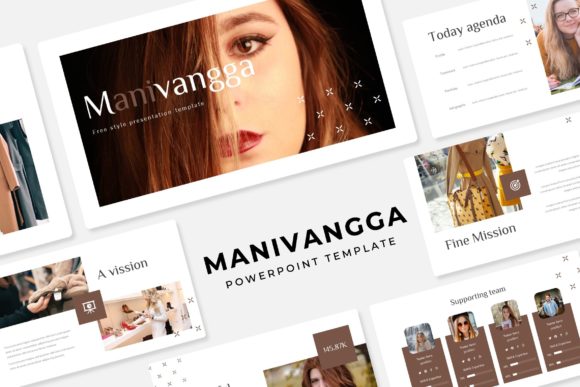
It is important to note that the photographs or images shown in the preview are not included in the download. They are used for illustration purposes only. This is standard practice for professional templates, and the placeholder system makes it easy to insert your own images without disrupting the layout.
Practical Implications for Different Users
For business owners and marketers, the ability to produce a branded, high-quality deck quickly is a competitive advantage. Whether you are preparing for a client meeting, a conference talk, or a product launch, the template reduces the time between idea and polished presentation. The five color variations also allow you to tailor the visual tone to different audiences without recreating the deck.
For educators and trainers, the section break slides and infographic layouts are especially useful. Teaching often involves moving through distinct modules, and visual transitions help students follow along. The infographic slides can simplify complex theories or data points, making them more accessible to learners.
For freelancers and creators, the portfolio and gallery slides provide a professional framework for showcasing work. Instead of spending hours designing a unique portfolio layout for each client or project, you can use the template as a consistent foundation. This lets your work take center stage while the design supports, rather than distracts.
For bloggers and content creators who repurpose presentations into social media graphics or video thumbnails, the clean, pixel-perfect illustrations ensure that your visuals remain sharp across platforms. The widescreen format also adapts well to YouTube thumbnails, Instagram carousels, and other digital formats.
How the Template Fits Broader Trends in Presentation Design
There is a growing emphasis on visual storytelling in professional communication. Audiences have less patience for text-heavy slides and cluttered layouts. The Manivangga template responds to this by prioritizing clean compositions, intentional negative space, and visual hierarchy. The infographics, gallery slides, and section breaks all serve the goal of clarity.
Another trend is the move toward modular, reusable design assets. Professionals are looking for templates that are not one-off solutions but can be adapted across multiple projects. The five-color system and master slide structure make Manivangga a long-term resource rather than a single-use purchase. You can build a library of presentations using the same template, each with a distinct color identity, and maintain visual coherence across your work.
The demand for speed without sacrificing quality continues to grow. In fast-paced work environments, the ability to produce a professional deck in hours rather than days is a real advantage. By handling the design groundwork and providing thoughtful layouts, Manivangga allows you to focus on content and delivery.
Final Thoughts on the Manivangga Power Point Template
The Manivangga Power Point Template is a well-rounded solution for anyone who creates presentations regularly. With 150 slides across five color variations, handcrafted infographics, section breaks, portfolio layouts, and a master-slide structure, it offers both depth and flexibility. The resizable graphics, drag-and-drop placeholders, and pixel-perfect illustrations remove common friction points in the design process.
Whether you are a business professional preparing a quarterly review, a teacher structuring a multi-session course, or a creative building a visual portfolio, this template provides a reliable foundation. It respects your time by reducing repetitive tasks and empowers you to present with confidence. In a world where how you present often shapes how your message is received, having a tool like Manivangga makes a tangible difference.