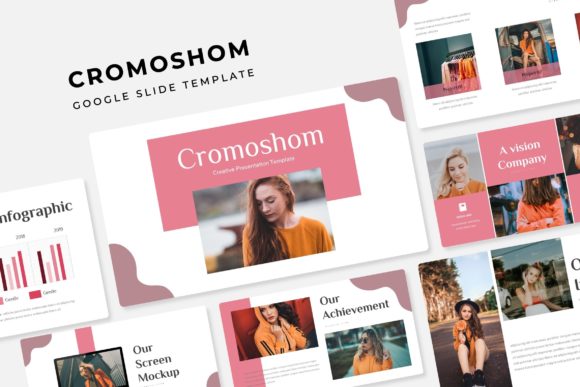
Cromoshom Google Slide Template: A Strategic Tool for Purposeful Presentations
Presentations are rarely just about slides. They are about clarity, persuasion, and momentum. Whether you are pitching to a potential client, training a team, or presenting market research to stakeholders, the medium shapes how your message lands. The Cromoshom Google Slide Template offers a structured yet flexible foundation for creating presentations that support strategic goals without requiring design expertise. Understanding what this template provides and how to use it intentionally can help you communicate more effectively, save time, and maintain consistency across projects.
This article explores the Cromoshom Google Slide Template in detail, examines its practical applications, and offers guidance on how to approach it as a decision-making tool rather than a quick fix. The goal is to help you use this resource thoughtfully, aligning its features with your specific objectives and audience needs.
What Cromoshom Google Slide Template Offers and Why That Matters
At its core, the Cromoshom Google Slide Template is a presentation framework built for flexibility and scale. With 150 total slides organized across five premade color variations, each containing 30 slides, the template gives you a wide range of layouts without forcing you to start from scratch. This structure is useful for people who create presentations regularly and need a system that reduces repetitive work while preserving visual quality.
The inclusion of handcrafted infographics, section breaks, gallery slides, and portfolio layouts means you can address different communication needs within a single presentation. Whether you are explaining a process, showcasing work, or transitioning between topics, the template provides dedicated slides for each purpose. The resizable and editable graphics, combined with picture placeholders that support drag-and-drop functionality, make it straightforward to adapt visuals to your own content.
Because the template is built on master slides, changes made at the master level apply across the entire presentation. This is particularly valuable when you need to update branding elements like colors, logos, or typography without editing each slide individually. The pixel-perfect illustrations further ensure that the visual output remains sharp and professional, even after resizing.
For anyone who needs to produce multiple presentations over time, having five separate PPTX files with widescreen formatting and premade color schemes means you can maintain a consistent look while varying the tone or emphasis depending on the audience. This kind of systematic approach reduces decision fatigue and lets you focus on content rather than formatting.
Strategic Use Cases for Cromoshom Google Slide Template
The value of any template depends on how well it fits the context in which it is used. Cromoshom is not a one-size-fits-all solution, but it does cover a broad spectrum of common presentation scenarios. Understanding when and why to use it can help you get more from the tool.
For business owners and entrepreneurs, the template supports pitch decks, investor updates, and product launches. The portfolio and gallery slides allow you to showcase work visually, while the infographic layouts help simplify complex data into digestible visuals. If you are presenting to a board or potential partner, the section breaks give your presentation a professional rhythm, guiding the audience through your narrative without abrupt transitions.
Marketers and content creators can use the template for campaign presentations, editorial calendars, or brand guidelines. The multiple color variations make it easy to adapt the same structure to different campaigns or client preferences. Instead of rebuilding slides for each new project, you can reuse the framework and swap visuals and copy as needed.
Educators and trainers will find the template useful for course materials, workshop decks, and training modules. The infographics and section breaks help segment information into manageable parts, which supports learning and retention. The drag-and-drop image placeholders make it easy to incorporate diagrams, screenshots, or photos without worrying about alignment or sizing.
Freelancers and consultants often need to present proposals, case studies, or portfolio reviews. Having a consistent template that looks professional and adapts to different clients saves time and reinforces your brand. The five color variations give you flexibility to match a client's brand or to differentiate between service offerings without creating entirely new presentations.
How to Approach Cromoshom Thoughtfully Rather Than Randomly
Using a template without a clear goal can lead to presentations that look polished but lack substance. The Cromoshom Google Slide Template is a tool, not a strategy. To use it effectively, start by defining the purpose of your presentation before you open the file.
Ask yourself what you want your audience to know, feel, or do after viewing your slides. If the goal is to inform, focus on clarity and data visualization. If the goal is to persuade, emphasize storytelling and key takeaways. If the goal is to inspire, use visuals and rhythm to create emotional impact. Once you have clarity on the outcome, you can select the appropriate slides from the template and arrange them to support that outcome.
One practical approach is to map your content to the slide types available in Cromoshom. For example, use section breaks to separate major themes, infographic slides to explain processes or data, and portfolio slides to demonstrate results or case studies. This alignment between content structure and slide functionality makes your presentation easier to follow and more memorable.
Another consideration is color. The template includes five premade color variations, each with 30 slides. Before choosing a color scheme, think about your brand identity, the audience's expectations, and the tone of the presentation. A conservative client may respond better to muted or neutral tones, while a creative audience may appreciate bolder colors. The ability to switch between color sets without redesigning slides gives you flexibility, but the choice should be intentional.
Practical Tips for Customizing the Template
Customization is where the template shifts from a generic resource to a personalized tool. Because the Cromoshom template uses master slides, you can make global changes quickly. Start by updating the master slide with your logo, brand colors, and preferred fonts. This ensures consistency across all slides and saves time later.
The picture placeholders are designed for drag-and-drop use, but you can also replace images with your own graphics, screenshots, or illustrations. Be mindful of image quality and resolution, especially if you are presenting on a large screen or sharing digitally. The template's pixel-perfect illustrations maintain clarity, but imported images should match that standard.
If you are using the template for multiple presentations, consider creating a folder structure that separates the original files from customized versions. The five PPTX files included with the template can serve as starting points for different types of presentations. Keep a master copy of each color variation and duplicate it before making changes. This prevents accidental overwrites and gives you a clean starting point each time.
Fonts are another important detail. The template includes a link to download the recommended free fonts. Install these fonts before you begin editing to avoid formatting issues. If you need to use a different font for brand or accessibility reasons, test it within the template to ensure spacing and alignment remain intact.
Risks of Using the Template Without Clear Goals
Relying on a template without understanding its limitations can undermine the effectiveness of your presentation. One common risk is overloading slides with content because the template provides space for it. Just because a slide has placeholders for multiple graphics or text blocks does not mean you should use them all. Cluttered slides confuse audiences and dilute your message.
Another risk is using the same template for every presentation regardless of context. While consistency is valuable, audiences may perceive a lack of effort or relevance if every presentation looks identical. The five color variations in Cromoshom help mitigate this, but you still need to tailor the content and visual emphasis to each specific audience and purpose.
There is also a risk of mistaking visual polish for substance. A well-designed template can make weak content look professional, but it cannot make it compelling. If your data is incomplete, your argument is flawed, or your call to action is unclear, no template will fix that. Use the template as a delivery mechanism, not a substitute for thoughtful preparation.
Finally, be aware that the photographs and pictures shown in the preview are for illustration only and are not included with the template. You will need to source your own images. Planning for this upfront prevents last-minute scrambling and ensures your visuals are relevant and high quality.
Integrating Cromoshom into Your Broader Workflow
A presentation template is most valuable when it fits into a larger system for creating, storing, and reusing content. If you frequently create presentations, consider building a library of slides from Cromoshom that you can mix and match based on the project. This reduces redundant work and helps you maintain consistency across different teams or departments.
For example, you might create a standard introduction slide set using one color variation, then develop separate slide banks for case studies, data visualizations, and closing calls to action. Over time, you can assemble presentations more quickly by selecting from these prebuilt components rather than starting from scratch each time.
Collaboration is another factor. If you work with a team, share the template files along with guidelines on how to use them. Specify which color variations correspond to which types of presentations or clients. This alignment prevents inconsistency and saves time during review cycles.
For solo practitioners, the template can serve as a personal brand asset. Keep a consistent visual style across your proposals, reports, and portfolio reviews. Over time, this builds recognition and trust with your audience, even if they do not consciously notice the design consistency.
Long-Term Value and Decision-Making Considerations
Investing time in learning a template like Cromoshom pays off when you use it repeatedly. The master slide structure, editable graphics, and multiple color variations are features designed for ongoing use rather than one-time projects. If you anticipate creating more than a few presentations per year, the template can save hours of formatting work and help you maintain a professional standard.
However, the decision to use this template should be based on your specific needs. If your presentations require highly custom animations or non-standard layouts, a template may be too restrictive. Similarly, if you work in a field where visual innovation is a core part of your value proposition, relying on a prebuilt template might limit your creative expression. In those cases, the template can still serve as a starting point, but plan to invest additional time in customization.
For most professionals, the balance between efficiency and quality is what matters. The Cromoshom Google Slide Template offers a strong middle ground: enough structure to save time, enough flexibility to adapt to different contexts, and enough visual quality to support professional communication. Used thoughtfully, it becomes a tool that supports better decisions, clearer messaging, and more consistent branding.
Before purchasing or downloading the template, review the included files and read the README file for font and usage instructions. Understanding what is included and what is not prevents surprises and helps you plan your workflow. And remember that the final quality of your presentation depends less on the template itself and more on how well you align it with your goals, your content, and your audience.