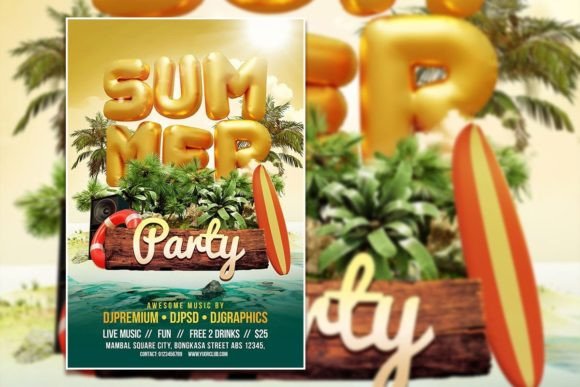
Summer Flyer Template for Events and Campaigns
A well-designed flyer can set the tone for an entire event or promotion, and a flexible Summer Flyer or Poster Template gives you a head start without sacrificing originality. Whether you are planning a beach party, a seasonal sale, or a community gathering, the right template saves hours of layout work while leaving room for your personal touch. The appeal lies in the balance between structure and freedom: you receive a professionally crafted PSD file—2000 x 3000 pixels, 300 dpi, CMYK-compatible RGB mode—and you can replace the photo, swap the text, and adjust the colors to match your vision. This is not a rigid design; it is a starting point that respects your creative direction.
For designers, small business owners, marketers, and hobbyists alike, the ability to edit every layer means you can produce results that look custom without needing to build from scratch. The organized layers in Adobe Photoshop make it straightforward to change fonts using the text tool, replace imagery, and tweak composition. The result is a polished piece that feels intentional and aligned with your brand or event identity.
Creative Possibilities with a Summer Flyer Template
The versatility of a Summer Flyer or Poster Template extends far beyond basic party announcements. Its structured layout can support a wide range of applications, each requiring a slightly different visual treatment. By starting with a reliable base, you can explore variations in mood, audience, and purpose without losing coherence.
Party Promotion and Event Marketing
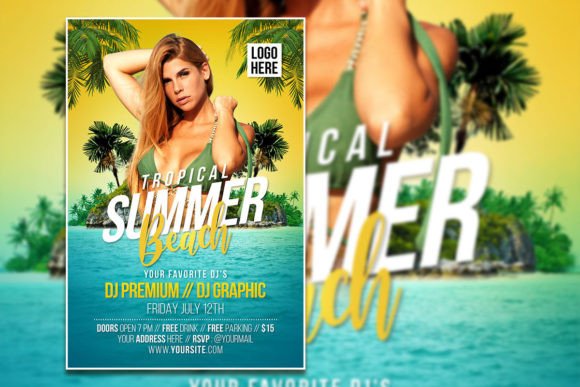
The most obvious use is promoting a summer party—a poolside gathering, a sunset beach event, or a backyard barbecue. The template’s large canvas (2000 x 3000 px) gives you plenty of space for event details, a bold headline, and an eye-catching photo. You can replace the stock image with a candid shot from a previous event or a stylized product photo to create a more authentic connection with your audience. For a pool party, consider using bright, saturated colors and a fun, sans-serif font for the title. For an evening beach party, shift the palette to warm sunset tones and use a serif or handwritten style for a relaxed, elegant feel.
Social media posts are another natural extension. By scaling down the flyer to platform-specific dimensions (1080 x 1080 px for Instagram, for example) and keeping the core design elements intact, you maintain visual consistency across print and digital channels. The editable PSD makes resizing straightforward, and you can create a series of variations—announcement, countdown, schedule highlight—all from the same base template.
Brand Storytelling and Product Launches
A summer-themed template is not limited to parties. Brands launching seasonal products—such as sunscreen, outdoor gear, or beverages—can use the layout to introduce new items in a context that feels timely and relevant. Replace the photo with a product image, adjust the headline to reflect the launch message, and use the remaining space for key features or a call to action. The high resolution (300 dpi) ensures that printed materials look sharp, whether you produce small handouts or larger posters.
For a more editorial approach, you can treat the template as a storytelling tool. Use the large image area to show lifestyle photography—people enjoying the product in a summer setting—and let the text block deliver a short narrative or testimonial. This approach works well for bloggers and influencers who want to create shareable content that feels personal rather than purely promotional.
Educational and Community Announcements
Educators and community organizers can adapt the same template for summer camps, workshops, or local festivals. The clean layout and editable text make it easy to include schedule details, registration links, or contact information. By choosing a friendly, straightforward typeface and keeping the photo relevant to the activity (e.g., kids playing outdoors, a workshop space), you create a flyer that communicates warmth and professionalism. The organized layers let you swap out the photo and adjust the color scheme to match a school or community brand without starting over.
Adapting the Template for Different Audiences
Different users will approach the Summer Flyer or Poster Template with different goals. Understanding how to tailor the design for specific audiences ensures that the final piece resonates and performs well.
Small Business Owners and Retailers
If you run a small business, time and budget are often tight. A ready-made template lets you create a seasonal promotion without hiring a designer. Focus on clarity: place the offer or event date prominently, use high-contrast colors for readability, and keep the photo clean and relevant. For a summer sale, a simple product shot on a bright background can be more effective than a cluttered composition. Test different font sizes and placements using the text tool to ensure the most important information is immediately visible at a glance.
Freelancers and Creatives
Freelancers—photographers, event planners, graphic designers—can use the template as a portfolio piece or a client deliverable. Because every layer is editable, you can demonstrate your ability to adapt a base design to different brand identities. When working with a client, start by discussing their visual preferences (color palette, typography, image style) and then customize the template accordingly. The instant download format means you can have a working draft ready within minutes, leaving more time for revisions and creative refinements.
Marketers and Content Creators
For marketers who need to produce consistent content across multiple channels, the template offers a reliable framework. Create a master version with your brand colors and logo, then generate variations for different platforms: a vertical poster for Instagram Stories, a square version for feed posts, and a horizontal layout for Facebook or email headers. The 300 dpi resolution also supports high-quality print runs for physical distribution at events or in-store displays.
Practical Recommendations for Effective Design
Even with a strong template, the choices you make during customization determine the final impact. A few practical guidelines can help you maintain clarity and visual appeal.
Typography and Readability
The template allows you to change the font by selecting the text layer and typing your own content. When choosing typefaces, prioritize legibility over decoration. A clean sans-serif works well for headlines and short bursts of information, while a simple serif or humanist font can make longer body text easier to read. Limit the number of typefaces to two or three to keep the design cohesive. Use size and weight to establish hierarchy—large, bold type for the main message, smaller regular weight for details—so viewers scan naturally from top to bottom.
Photo Integration and Customization
Replacing the photo is one of the most effective ways to personalize the template. Choose an image that supports your message without distracting from the text. For a party flyer, a candid group shot or a scenic location photo often works better than a staged studio image. If you are promoting a product, ensure the lighting and color temperature of the photo align with your brand palette. The PSD file’s smart layers make swapping images straightforward, and you can apply subtle adjustments (brightness, contrast, color balance) directly within Photoshop to make the photo feel integrated rather than pasted on.
Color and Mood
Seasonal colors can reinforce the summer theme without overwhelming the design. Think warm yellows, coral, turquoise, and sandy neutrals. Use your brand colors as accents rather than the entire palette to maintain recognition while embracing the seasonal shift. If the template includes background gradients or overlay effects, experiment with opacity levels to find a balance that keeps text readable. A color scheme that feels cohesive across all elements—photo, typography, background—creates a professional, considered look.
Keeping Results Clear and Consistent
Consistency matters whether you are producing a single flyer or a series of promotional materials. Start by defining a small set of visual rules: your primary and secondary colors, one or two typefaces, and a preferred image style. Apply these rules to every version of the template you create, so your audience recognizes the material instantly regardless of context. This is especially important for small business owners and marketers who need to build brand recognition over time.
Clear organization within the template also helps. Because the PSD file comes with organized layers, you can hide, rename, or group elements to suit your workflow. Keep the most important information—event name, date, location, call to action—in the upper half of the canvas, where it is most likely to be seen. Use negative space intentionally to prevent the design from feeling crowded. If you are adding multiple details (schedule, sponsors, social links), consider using a list format within the text block to improve scanability.
Testing your design at different sizes is another practical step. What looks balanced on a full-screen monitor may feel cramped on a phone or printed at small scale. Resize your working file to approximate final output dimensions and check that the text remains readable and the focal point still works. The high resolution of the template gives you flexibility, but it is still wise to verify legibility early in the editing process.
Finally, remember that a template is a tool, not a crutch. The best results come from treating the PSD as a flexible foundation—adjusting colors, swapping photos, rewriting headlines—rather than simply filling in the blanks. By investing a little time in customization, you create a flyer that feels unique to your event, brand, or audience. The Summer Flyer or Poster Template provides the structure, but your decisions bring it to life.