Car Wash Social Media Post Design That Works
Scrolling through Instagram or Facebook, you have maybe two seconds to stop someone's thumb. For a car wash business, that first impression matters even more because you are selling a visual result — a clean, shiny car. If your social media graphics look dusty or thrown together, potential customers assume your actual service will match. That is exactly where a dedicated Car Wash Social Media Post Design template set saves the day. It is not just a graphic; it is a pre-built visual system that communicates professionalism before a customer ever pulls into your lot.
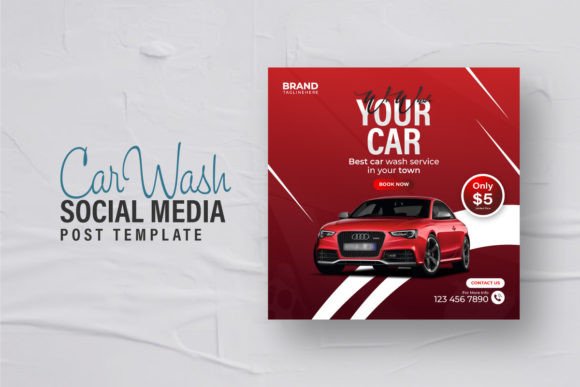
This particular design asset is a clean, eye-catching, professional template built specifically for car wash businesses. It comes as an editable EPS file for Adobe Illustrator, sized at 500×500 pixels with a 300 DPI resolution. All text layers are fully editable, colors are easy to swap, and the templates use free fonts so you do not have to buy additional typefaces. The note says images are not included, but that is standard — you drop in your own photos of actual clean cars or happy customers.
Let us break down what this template actually offers and how you can use it to build a better social media presence for your car wash business.
Visual Characteristics and Personality
Looking at the template's design language, it leans heavily into modern, clean composition. The 500×500 pixel square format is ideal for Instagram feed posts, Facebook square ads, and even LinkedIn or Twitter carousel starters. The high resolution at 300 DPI means you could repurpose these for print flyers or small banners without losing quality.
The visual personality is straightforward and trustworthy. There is no excessive ornamentation or trendy effects that will look dated in six months. Instead, the design prioritizes clarity — large readable text, clear calls to action, and plenty of breathing room around the central message. That is smart because a car wash customer is usually making a quick decision: "I need my car cleaned today, and this place looks professional."
The color scheme is easy to modify, which matters because car wash branding varies wildly. Some businesses lean into blues and whites for a clean, watery feel. Others use bold reds or yellows for energy. The template's structure supports those changes without breaking the layout. You are not fighting the design; you are simply filling in your brand colors.
Where This Design Works Best
This Car Wash Social Media Post Design template is not a one-size-fits-all generic graphic. It was clearly built with a specific industry in mind, and that focus shows in the composition choices. Here is where it performs strongest across different projects and platforms.
Social Media Graphics
Obviously, this is the primary use case. The square format fits Instagram, Facebook, and LinkedIn perfectly. You can create weekly posts announcing specials — "Wash & Wax Wednesday" or "Weekend Detail Special" — and maintain consistent branding every single time. The editable text means you can swap out offers, prices, or seasonal messages without opening a new design from scratch.
For social media managers running multiple locations, having a template system saves hours each month. You batch create a month's worth of posts in an afternoon, change the background image or offer text, and schedule them out. Consistency builds recognition, and recognition builds trust.
Digital Advertising
Facebook and Instagram ad managers require square or vertical images that stand out in a crowded feed. The clean layout of this template ensures your call to action is not buried under visual noise. You can use the design as a base for paid ads, then test different offers or images without redesigning the whole creative each time.
Print Materials
Because the file is 300 DPI at 500×500 pixels, you can print these designs as small flyers, coupons, or even car door magnets. A car wash business might use the same design for a laminated counter sign, a window decal, or a handout at a local event. One design file, multiple physical applications.
Brand Identity Reinforcement
Beyond individual posts, using a consistent template across all your social media creates a cohesive brand identity. Customers scrolling their feed start to recognize your posts before they even read the text. That visual shorthand is valuable for recall. When someone needs a car wash and remembers seeing your clean, professional posts, you have already won half the battle.
How Design Influences Readability and Engagement
A social media post for a car wash has one job: get the viewer to take action. That action might be booking an appointment, calling for a price, or simply driving to your location. The design either helps or hurts that goal.
The template's layout prioritizes visual hierarchy. The main headline is prominent, the supporting text is smaller but still readable, and the call to action stands out. When someone glances at the post, their eye naturally moves from the image (the clean car), to the headline (the offer), to the button or instruction. That flow is intentional.
Readability is another factor. The free fonts used in the template are clean and legible, even at smaller sizes on mobile screens. That matters because over 80% of social media browsing happens on phones. If your text is too small or too decorative, people will scroll past without absorbing your message.
From a brand perception standpoint, professional design signals that you care about details. A car wash is a detail-oriented business — customers trust you to clean every inch of their vehicle. If your marketing looks careless, they assume your service will match. Using a polished template like this one tells customers, "We pay attention to the little things."
Consistency across multiple posts builds recognition. When every post uses the same layout, colors, and font treatment, your brand becomes familiar. Familiarity leads to trust, and trust leads to engagement. People are more likely to comment, share, or click on content from a brand they recognize.
Practical Guidance for Using This Template
You do not need to be a professional designer to make this template work. The product description says you only need basic Illustrator knowledge to edit the text, and that is accurate. Let me walk through some practical considerations for getting the most out of it.
Choosing the Right Images
The template uses placeholders for images, but the final look depends on your photos. Use high-quality shots of actual cars you have detailed. Avoid generic stock photos if possible. A real photo of a customer's car gleaming under the sun outperforms a generic stock image every time. If you do not have good photos yet, take some this week. A well-lit shot of a clean car against a simple background is all you need.
Font Pairing and Typography
The template comes with free fonts, which is a huge advantage. You do not have to purchase expensive typefaces to get a professional look. If you want to customize further, consider pairing a sans serif font for headlines with a clean serif font for body text, or keep it all sans serif for a modern, streamlined feel. Avoid using a script font or handwritten font for the main headline in this context — it can reduce readability on small screens. Save decorative fonts for secondary accents or seasonal posts.
If you eventually want to expand your brand toolkit, look for a premium font that matches your brand personality. A display font for occasional promotional headers can add variety, but keep the core template consistent.
Color Customization
Change the template colors to match your existing brand palette. If you do not have a defined palette, choose two or three colors that feel clean and automotive-friendly. Deep blue, bright white, and silver or gray work well for car washes. Avoid muddy or dark color schemes that make the design feel dirty — remember, you are selling cleanliness.
Commercial Licensing
Since this is a commercial template, check the license terms for the fonts and design elements. The product says free fonts are used, which typically means you can use them in commercial social media posts without extra fees. However, if you swap in a different font, make sure it is licensed for commercial use. Many free font websites offer commercial licenses, but always double-check.
Real-World Examples of This Template in Action
Imagine a local car wash running a summer special. They take the template, swap in a photo of a bright red sedan after a full detail, and change the headline to "Summer Shine Special — $39.99 Full Wash & Wax." The call to action reads "Book Now" with an arrow. They post it on Instagram on Monday morning. By Wednesday, they have booked twelve appointments from that single post.
That is not magic — it is consistency and clarity. The template made it easy to create a professional-looking post in under twenty minutes. Without the template, the owner might have spent an hour fighting with Canva or Photoshop, ended up with something mediocre, and posted it late anyway.
Another example: a mobile detailing service uses the template to post before-and-after shots. They keep the layout the same but swap the image each time. Over a month, they build a visual gallery of their work, all framed in the same professional design. Potential customers see the consistency and think, "These people know what they are doing."
Final Recommendations
If you are a car wash owner, marketer, or social media manager looking for a reliable template that does not require advanced design skills, this Car Wash Social Media Post Design asset is a solid choice. It gives you a professional foundation without locking you into a rigid format. You can adapt it for daily posts, weekly specials, seasonal campaigns, and even print materials.
The key is to use it consistently. Do not post once and forget about it. Build a content calendar, batch create your posts, and keep the design uniform across all platforms. Over time, that consistency will build recognition, trust, and engagement. And in the car wash business, a clean brand presence is just as important as a clean car.