Back to School Flyer or Poster: A Practical Tool for Seasonal Marketing
Every year, the back-to-school season creates a predictable but important window for businesses, educators, and organizations to communicate key messages. Whether you're promoting supplies, tutoring services, after-school programs, or enrollment deadlines, having a well-designed flyer or poster can make a significant difference in how your message is received. The Back to School Flyer or Poster template offers a structured, editable solution that balances visual appeal with practical functionality. It is not about flashy gimmicks or overproduced graphics; it is about delivering a clear, professional announcement that works across multiple use cases.
What Makes This Template Worth Your Attention
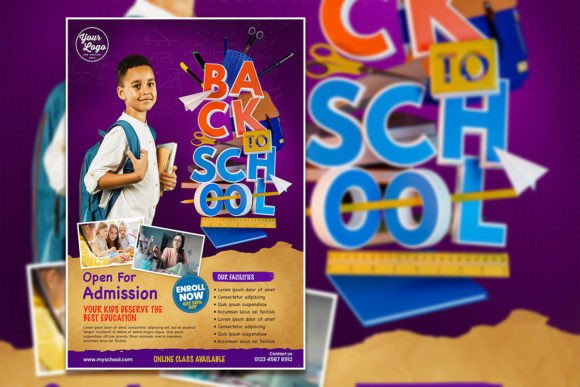
The Back to School Flyer or Poster is a Photoshop PSD template designed to help you produce a 2000 x 3000 pixel flyer at 300 dpi resolution. The color mode is RGB, which is suitable for both digital display and print, as long as your output method aligns with RGB expectations. The file comes with organized layers, and all text is fully editable using the standard text tool in Adobe Photoshop. You can also replace the sample photo with your own image for a more customized look.
What distinguishes this template from generic, overused designs is its intended purpose: it is built specifically for the back-to-school context but flexible enough to adapt to related promotions. The product description notes that you can use it "for whatever you want," but its real strength lies in its suitability for announcements that require a clear, uncluttered layout. The organized layers mean you can edit individual elements without disrupting the overall design, which saves time and reduces frustration during revision cycles.
Key Characteristics and Design Considerations
The template delivers a 4:6 aspect ratio, which is a common poster orientation suitable for printing on standard paper sizes or posting on social media feeds. The 300 dpi resolution ensures that printed versions remain crisp, while the 2000 x 3000 pixel dimensions provide enough detail for high-quality digital use. The organized layer structure is a practical feature for workflow efficiency, especially if you need to create multiple variations for different audiences or channels.
One of the most valuable aspects is the "instant download" format. Once you purchase and download the PSD file, you can begin editing immediately, assuming you have Adobe Photoshop installed. The template does not require additional software or plugins, which keeps the barrier to entry low. The text replacement process is straightforward: select the text layer with the text tool and type your own copy. Font changes are also possible by selecting the text and applying a different typeface, though the template likely includes a specific set of fonts that you may need to have or substitute.
Real-World Performance and Practical Value
In practice, the Back to School Flyer or Poster template performs well for time-sensitive campaigns. The back-to-school season often requires quick turnarounds, and a pre-built layout can reduce design time from hours to minutes. For a small business owner promoting discounted supplies, the template allows you to insert pricing details, dates, and contact information without starting from scratch. For a tutoring center, you can replace the placeholder photo with a real image of your facility or instructors, which adds authenticity to your marketing.
The real-world effectiveness of this template depends largely on how you customize it. The base design provides a clean structure, but your choice of fonts, colors, and images will determine whether the final piece feels generic or uniquely yours. The freedom to replace the photo is particularly useful for building brand recognition, as you can maintain visual consistency across your materials while still using the template's layout. The organized layers also make it easier to experiment with different color schemes or arrangements without risking the original design.
Quality, Usability, and Flexibility in Daily Work
From a quality standpoint, the template's resolution and color mode are appropriate for both digital and print contexts. RGB is standard for on-screen use, and the 300 dpi resolution means printed versions should appear sharp at the intended output size. The organized layer structure reflects thoughtful preparation, making it suitable for users who may not have extensive Photoshop experience. If you have basic familiarity with layers and the text tool, you can achieve professional-looking results without advanced design skills.
Usability is one of the template's strongest suits. The instant download and straightforward editing process align with the needs of busy professionals who cannot afford lengthy design iterations. The template works well for creating flyers, posters, social media graphics, and even email headers if you crop appropriately. Its flexibility extends to different types of promotions: enrollment drives, open houses, supply sales, curriculum highlights, and parent-teacher meeting announcements all fit naturally within the layout.
However, flexibility also has boundaries. The template is designed for Adobe Photoshop, which means it is not compatible with free tools like GIMP without potential layer support issues, nor is it easily editable in Canva. If your workflow relies on browser-based or mobile editing tools, this template may not suit your process. The requirement for Photoshop is clearly stated, but it is worth emphasizing if you or your team do not have access to the software.
Who Benefits Most and in What Situations
This template is most valuable for small business owners, educators, school administrators, tutors, and independent professionals who need to produce promotional materials quickly without sacrificing quality. Marketers at educational organizations or retail stores that serve school supplies will find the template directly applicable. Freelancers and serious hobbyists who occasionally produce materials for local schools or community groups will also appreciate the time savings.
Specific use cases include:
- Email announcements and event promotions for tutoring centers or after-school programs.
- Digital posts for school district social media accounts or community boards.
- Printed flyers distributed near schools or at local events such as fairs and open houses.
- Promotional materials for bookstores, supply retailers, or uniform shops targeting the back-to-school period.
In each of these scenarios, the template provides a foundation that you can adapt to your specific messaging needs. The editable text and replaceable photo mean you are not locked into a single look, and the organized layers make it easy to maintain consistency across multiple pieces.
Professional Observations and Practical Recommendations
One practical recommendation is to treat the template as a starting point rather than a final design. While the layout is clean and functional, taking the time to adjust colors, typography, and imagery to match your brand will significantly improve the final impact. The ability to replace the photo is a genuine advantage; using a generic stock image may undermine the authenticity of your message, while a real photograph of your team or space can build trust with your audience.
Another observation is that the 4:6 aspect ratio is more portrait-oriented, which works well for door hangers, bulletin board postings, and vertical social media stories. However, it may not be ideal for wide social media banners or horizontal print placements. Keep your final distribution channel in mind when customizing the template. If you need a square or landscape version, you may need to adjust the canvas size, which could affect the layout and require additional editing.
For long-term value, the template can be reused across multiple seasons if you maintain organized versions of your edits. Keep a backup of the original PSD file and create separate files for each year or campaign. This approach allows you to quickly update dates, details, and images without redoing the entire layout. Over time, the template becomes a reliable asset that reduces the workload for recurrent promotions.
Possible Limitations to Consider
No template is without limitations. The Back to School Flyer or Poster relies on Adobe Photoshop, which involves a subscription cost for most users. If you do not already have access to the software, the initial investment may outweigh the convenience for a single-use project. Additionally, the template's design is pre-configured for a back-to-school theme, which means some elements may require significant retooling if you want to use it for unrelated purposes. While the product description says it can be used for "whatever you want," the layout's structure is most effective for announcement-style content rather than complex, data-heavy designs.
Another limitation is that the template does not include print bleed or CMYK color mode, which are standard for commercial printing. If your plan involves offset printing or high-volume professional output, you may need to convert the color mode and add bleeds manually. This is a manageable step for experienced users but could be a hurdle for those unfamiliar with print production requirements.
Finally, the template's visual style may not appeal to every audience. School-related designs often need to balance professionalism with approachability, and if the template leans too much in one direction, you may need to adjust elements like fonts, colors, or layout spacing to better fit your specific audience. The organized layers make these adjustments possible, but they do require some design judgment.
Final Thoughts on Fit and Long-Term Value
The Back to School Flyer or Poster template is a sensible investment for individuals and organizations that need a reliable, editable design asset for seasonal promotions. Its strengths lie in its straightforward editing process, organized structure, and flexibility for both digital and print use. It is not a one-size-fits-all solution, but for the right user and the right context, it can save meaningful time while producing a polished result.
If you are comfortable with Adobe Photoshop and need a clean layout for back-to-school messaging, this template offers solid value. The ability to replace the photo and edit all text gives you control over the final look without requiring advanced design skills. By treating the template as a foundation and investing effort into customization, you can create a piece that feels personal and relevant to your audience. For small business owners, educators, and marketers working within limited time and budgets, it is a practical tool that serves its purpose without overcomplicating the process.